


Participant
September 3, 2025
Answered

Can't Install Old versions of Adobe CC Products

  • September 3, 2025
  • 2 replies
  • 214 views

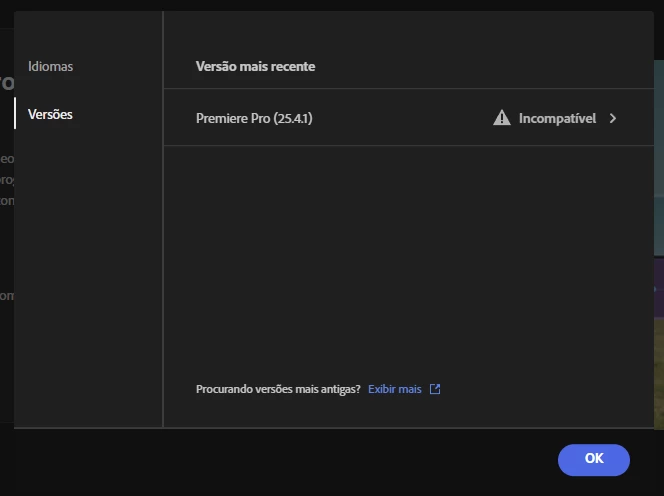
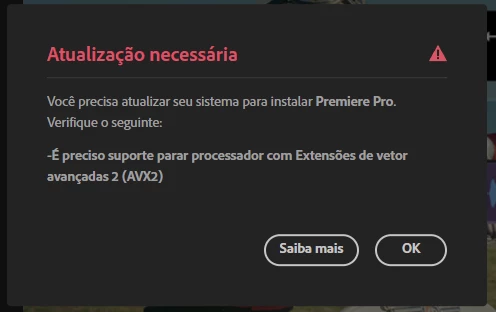
I tried to install Premiere that comes with my Student 1 Month Trial, but it appeared that I can't install on my windows since the newer versions of adobe's apps uses AVX2, which my PC doesn't have a CPU with support for that yet.


Everything OK, I searched how to install older versions, but I couldn't find any version at all listed on the versions.


Is there any way I can install older versions? Even Audition couldn't be installed because of this, which it kinda sucks.
 

Correct answer Jeffrey_A_Wright

Nhoque, I am sorry, but only versions that are available are within the Creative Cloud Desktop app. If you are purchasing a Creative Cloud membership for school, then you should check to see if they offer a subscription. If so, they may have the older version of the software available. For more information, see https://adobe.ly/4gfQ0P2.


If your school doesn't offer a plan, and you don't have a device capable of running the current releases of our software, Nhoque, then please cancel your subscription soon to avoid being charged. Please bookmark https://adobe.ly/45NQxUL for the steps you can implement to self-cancel your new individual subscription. ^JW

2 replies

Nancy OShea
Community Expert
Community Expert
September 3, 2025

Make sure your computer meets the minimum CPU & GPU requirements. Most Creative Cloud apps work on these systems, no more than 2 versions back:

  • Windows 11 (64-bit) versions 24H2, 23H2; Windows 10 versions 22H2, 21H2;
  • MacOS 15 (Sequoia), 14.7 (Sonoma), 13.6.7 (Ventura).

- https://helpx.adobe.com/creative-cloud/system-requirements.html
- https://helpx.adobe.com/ie/premiere-pro/system-requirements.html

NOTE: MS is ending Win10 support in October. And Apple will release Tahoe later this year.


Nancy O'Shea— Product User & Community Expert
Jeffrey_A_Wright
Community Manager
Jeffrey_A_WrightCommunity ManagerCorrect answer
Community Manager
September 3, 2025

Nhoque, I am sorry, but only versions that are available are within the Creative Cloud Desktop app. If you are purchasing a Creative Cloud membership for school, then you should check to see if they offer a subscription. If so, they may have the older version of the software available. For more information, see https://adobe.ly/4gfQ0P2.


If your school doesn't offer a plan, and you don't have a device capable of running the current releases of our software, Nhoque, then please cancel your subscription soon to avoid being charged. Please bookmark https://adobe.ly/45NQxUL for the steps you can implement to self-cancel your new individual subscription. ^JW
