



ArcySonic
Participant
May 3, 2026
Answered

Can't install Photoshop on macOS Monterey..

  • May 3, 2026
  • 4 replies
  • 53 views

Hi There.

I try to install Photoshop by CC on my Monterey and can't..
Found that post https://helpx.adobe.com/download-install/apps/download-install-apps/creative-cloud-apps/install-previous-versions-creative-cloud-apps.html which is actually pretty fresh, but..
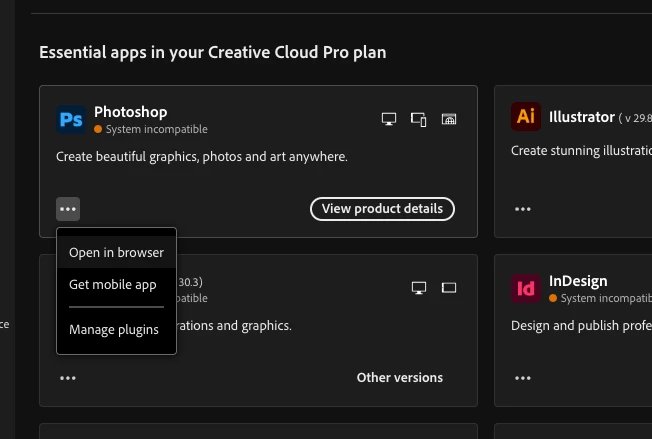


I’m doing something wrong or there is no option to install photoshop on Monterey anymore..


Thanks for feedback

arcy

    This topic has been closed for replies.
    Correct answer Nancy OShea

    You’ll need to upgrade to macOS 26 (Tahoe), 15 (Sequoia) or 14 (Sonoma) with latest updates.

    Monterey from 2021 is no longer supported by Adobe. It’s too far removed from the current release versions.


    Adobe expects user to have the latest OS, no more than 2 versions back.


    See the Photoshop requirements below:

    https://helpx.adobe.com/photoshop/desktop/get-started/technical-requirements-installation/adobe-photoshop-on-desktop-technical-requirements.html


    Hope that helps.


    4 replies

    Nancy OShea
    Community Expert
    Community Expert
    May 3, 2026

    I’m just an unpaid forum volunteer & fellow product user with no influence over what Adobe does. 

    If you didn’t read the current system requirements, that’s not my fault.


    Your friend is using a previously installed older version of Photoshop & never upgraded. Which means they don’t have access to current features, and they’re operating from a time capsule. Not ideal.


    I’m sorry you can’t use modern Photoshop. Maybe you should cancel your subscription until you get a new computer.


    Good luck.


    Nancy O'Shea— Product User & Community Expert
    Nancy OShea
    Community Expert
    Community Expert
    May 3, 2026

    Creative Cloud doesn’t offer older versions beyond the current & one previous release. Ver. 27 & 26.


    As a workaround, Photoshop can run on Win11 or Win10  PCs.

    That might be an affordable option to consider. 


    Nancy O'Shea— Product User & Community Expert
    ArcySonic
    ArcySonicAuthor
    Participant
    May 3, 2026

    Nancy.. really. 
     

    I pay for a subscription, so I expect you, as an expert, to focus on answers and help, not sales pitches.

    YOU ARE FRAUDGING CUSTOMERS. If someone bought a subscription and already has some equipment, and you're forcing them to buy a much more expensive one, it's a scam!

    If you're so generous in handing out tips on buying new equipment that can run Photoshop, then there's no problem.

    I'll give you my account number and ask for money for new equipment!
    arcy

    ArcySonic
    ArcySonicAuthor
    Participant
    May 3, 2026

    In case someone recommend me this …


    Still nothing..

    Same message from photoshop.

    arcy

    Nancy OShea
    Community Expert
    Nancy OSheaCommunity ExpertCorrect answer
    Community Expert
    May 3, 2026

    You’ll need to upgrade to macOS 26 (Tahoe), 15 (Sequoia) or 14 (Sonoma) with latest updates.

    Monterey from 2021 is no longer supported by Adobe. It’s too far removed from the current release versions.


    Adobe expects user to have the latest OS, no more than 2 versions back.


    See the Photoshop requirements below:

    https://helpx.adobe.com/photoshop/desktop/get-started/technical-requirements-installation/adobe-photoshop-on-desktop-technical-requirements.html


    Hope that helps.


    Nancy O'Shea— Product User & Community Expert