
Participant
October 27, 2018
Answered

Can't open apps because my drive is full?

  • October 27, 2018
  • 3 replies
  • 707 views

Hello! I've recently downloaded Creative Cloud to use the apps for college and personal purposes. However, I've run into an issue that prevents me from using any app at all.

Installing is not a problem and even in the CC app I've specified that I want all apps to be installed on my D:\ drive, as that driver has the most available space (250GB/871GB).

However I cannot open any of the apps because apparently there is not enough room to initialize?

I use W10. My system's in Dutch, but here's a screenshot of the error message I get.
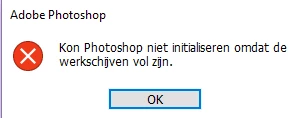
I get this message for every app, so it's not only an issue with Photoshop.

I could use the help! I want to be able to work at my own computer ASAP.

Thank you in advance!

This topic has been closed for replies.
Correct answer Govardhan.V

Try with the steps mentioned in below link :

Scratch disk full and cannot open photoshop to fix it...

You may also try with the Drive Defragmentation and increasing Virtual Memory.

3 replies

Rachel_PAuthor
Participant
November 20, 2018

Additional post:

While at first drive defragmentation did solve the issue, it now no longer works. I need a new solution!

Rachel_PAuthor
Participant
October 27, 2018

Well I'll be damned, the one thing I didn't think would help at all actually helped.

Thanks!

Govardhan.V
Govardhan.VCorrect answer
Participating Frequently
October 27, 2018

Try with the steps mentioned in below link :

Scratch disk full and cannot open photoshop to fix it...

You may also try with the Drive Defragmentation and increasing Virtual Memory.