


Sikosyn
Known Participant
February 11, 2020
Question

Can't SELECT ALL files in the DELETED folder in Creative Cloud.

  • February 11, 2020
  • 2 replies
  • 1427 views

Hi.  I posted this here because Creative Cloud does not seem to have a dedicated forum.

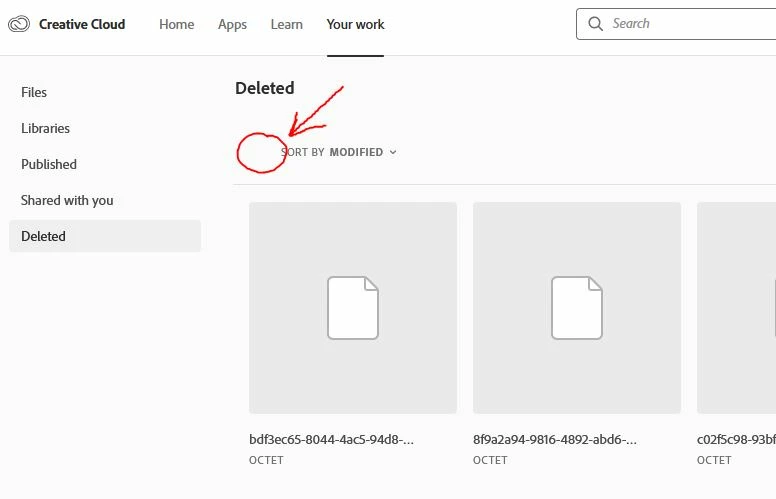
For some reason I don't have the SELECT ALL checkmark on the Creative Cloud site.
My storrage is getting full, and CC keeps all my deleted files in the cloud and counts it as part of my storrage.

I have thousands of files in the DELETED folder, but can't mass select them and delete. I'm not going to check each one.

According to tutorials I've seen, there is suppose to be a "SELECT ALL" checkmark, but I've tried multiple browsers and computers (see picture below).

This sucks.


2 replies

El Wombat
Inspiring
June 9, 2021

I have the same issue! 


The actual button is not showing! 


I tried this on Chrome, Firefox and Safari. It's not working... 

Participant
June 9, 2021

@El Wombat I was able to empty the trash through the Creative Cloud iOS app on my phone. They do have a empty trash button there and it works! Took me a loooooong time to find this solution, but it's simple and works!

Sikosyn
SikosynAuthor
Known Participant
February 11, 2020
Participant
January 11, 2021

Having the same issue. It's a really bad workaround, I have thousands and thousands of files there, and when scrolling to select all the page crashes. Can't beleive there is no "empty deleted files" folder or something of the sort. Horrible user experience.