


Can't Uninstall Adobe CC 2017 Apps
Since November 2016, i have installed on my Win10 laptop, two CC 2017 trials: Adobe Premiere Pro CC 2017 and Adobe Media Encoder CC 2017. I haven't used them for a long time and now i can't uninstall them.
When i go to Programs & Features menu and select Adobe Media Encoder CC 2017 to uninstall, an error appears, saying: "Windows cannot find 'C:\Program Files (x86)\Adobe\Adobe Creative Cloud\HD Core\Uninstaller.exe'". So, i can't uninstall it.
Inside Programs & Features menu, i see only Adobe Media Encoder CC 2017. Adobe Premiere Pro CC 2017 isn't listed there. On the other hand, both programs are listed inside Start menu.
I downloaded the CC desktop app and it didn't recognize any installed CC apps. Then, i uninstalled it.
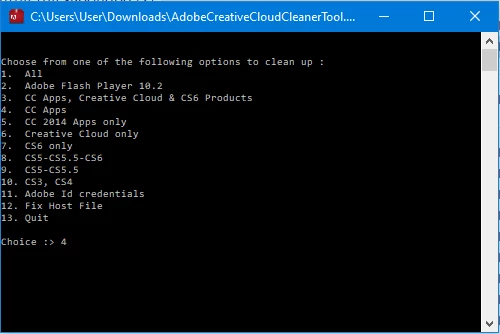
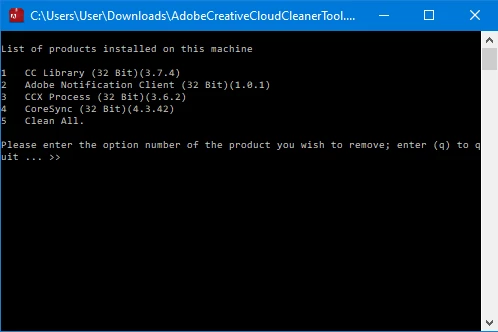
I used Adobe CC Cleaner Tool, selecting the 4th option (CC Apps), but CC Cleaner tool didn't give me Adobe Premiere Pro CC 2017 and Adobe Media Encoder CC 2017 in the list of apps to clean up.
Also, inside C:\Program Files\Adobe path, there are "Adobe Media Encoder CC 2017" and "Adobe Premiere Pro CC 2017" folders.
Could you tell me, how do i completely uninstall both programs?
 AdChoices