


Inspiring
March 14, 2021
Answered

can`t uninstall previous versions of adobe products, 2019.

  • March 14, 2021
  • 2 replies
  • 496 views

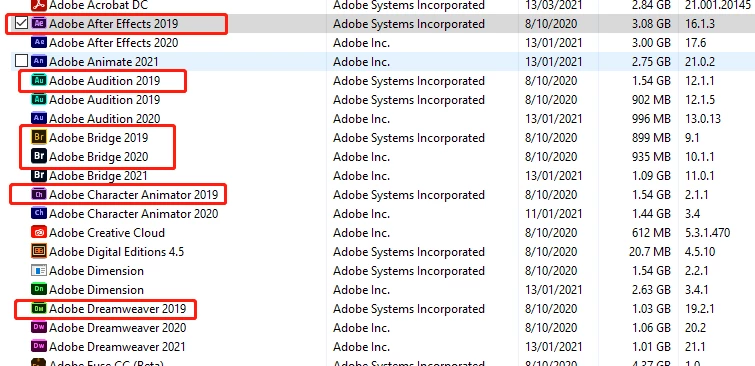
Im using windows 10, trying to use the Uninstall a program feature to delete 2019 and some 2020 adobe products (i`m a creative cloud subscriber). Howeve rwhen I uninstall attempt, nothing happens. 

I am attempting to uninstall one at a time, just showing how previous versions are taking up a lot of space here on the drive.

 

This topic has been closed for replies.
Correct answer Nancy OShea
quote

Hi Nancy, yes i`m clicking the desktop creative cloud app from the start menu, but no response from it, won`t open.


===========

After installing, restart computer.

On Windows, right-click on shortcut or desktop icon and select Run as Administrator.  Typically you only need do this the first time you start it.


2 replies

Nancy OShea
Community Expert
Community Expert
March 15, 2021

What happens when you open your Creative Cloud desktop app and hit the Uninstall button?


Nancy O'Shea— Product User & Community Expert
Inspiring
March 15, 2021

Hi Nancy, yes i`m clicking the desktop creative cloud app from the start menu, but no response from it, won`t open. Tried uninstalling from this menu as well with right click, no response, 


when I double click it, nothing happens (or click it).

have restarted my pc, same problem.


John thankyou, will attempt the CC cleaner tool tonight, 


*Wondering if I uninstall photoshop and illustrator 2019, will I also lose the:

  1. Workspaces
  2. Custom brushes
  3. Actions
  4. Patterns

Or will they stay put and be accessable by the latest version of PS and Ai? 


Nancy OShea
Community Expert
Nancy OSheaCommunity ExpertCorrect answer
Community Expert
March 15, 2021
quote

Hi Nancy, yes i`m clicking the desktop creative cloud app from the start menu, but no response from it, won`t open.


===========

After installing, restart computer.

On Windows, right-click on shortcut or desktop icon and select Run as Administrator.  Typically you only need do this the first time you start it.


Nancy O'Shea— Product User & Community Expert
John T Smith
Community Expert
Community Expert
March 14, 2021