powertoast
Participating Frequently
July 9, 2018
Answered

Cannot updat Creative Cloud over Private Internet Access VPN.

  • July 9, 2018
  • 1 reply
  • 2279 views

All of my apps work great, but I cannot check for updates or really use the Creative Cloud app at all when connected to my PIA VPN. It tells me I have no Internet Conection.

If I disconnect from the VPN it works great reconnect I loose my connection.

This topic has been closed for replies.
Correct answer Bani Verma

Thanks for the update Powertoast, can you please try the solutions shared in the following help document to check and confirm that there are no connectivity issues between the CC app and the Adobe servers: Resolve connection errors with Adobe Creative Cloud and Creative Suite applications.

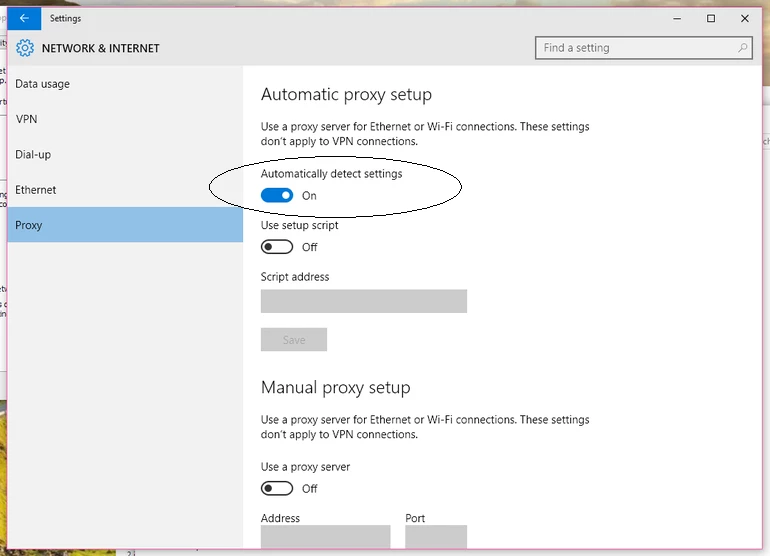
Also, make sure the 'Automatic Proxy Settings detection' is ON:
However, If it shows that there are no connectivity issues, then please perform the steps given under 'Solution 3' of the following help document to clean remove the CC Desktop app from your machine: "Failed to install" error received when installing Adobe Creative Cloud desktop app"

After this, use the direct download links given here: Download Creative Cloud desktop app, to download and install the app again and share the results.

1 reply

Bani Verma
Legend
July 9, 2018

Hi Powertoast,

As you have mentioned you are unable to use your Creative Cloud desktop app when connected to a VPN because the connection fails.

Kindly check and confirm if the ports 80 and 443 are enabled on that network, Creative Cloud uses these two ports to connect to Adobe servers. For more information see: https://helpx.adobe.com/content/dam/help/attachments/Creative_Cloud_for_enterprise_Service_Endpoints.pdf

What type of Creative Cloud membership do you have? Individual or Teams?

Awaiting your response.

(Moving this post to Creative Cloud Download & Install​ community.)

powertoast
Participating Frequently
July 9, 2018

They are enabled and I can connect to the the cloud versions of the adobe website and tools without problem.

It just appears to be the Creative Cloud app that has issues. Once again if I shut the VPN off it works perfectly but the second I turn it on then it says it does not have an internet connection.

Bani Verma
Bani VermaCorrect answer
Legend
July 10, 2018

Thanks for the update Powertoast, can you please try the solutions shared in the following help document to check and confirm that there are no connectivity issues between the CC app and the Adobe servers: Resolve connection errors with Adobe Creative Cloud and Creative Suite applications.

Also, make sure the 'Automatic Proxy Settings detection' is ON:

However, If it shows that there are no connectivity issues, then please perform the steps given under 'Solution 3' of the following help document to clean remove the CC Desktop app from your machine: "Failed to install" error received when installing Adobe Creative Cloud desktop app"

After this, use the direct download links given here: Download Creative Cloud desktop app, to download and install the app again and share the results.