Participant
June 4, 2017
Answered

Cannot update CC apps?

  • June 4, 2017
  • 1 reply
  • 312 views

I have a notification to update my CC apps on my Macbook. I was asked for my password which was correct but repeatedly rejected. I went down the route of "forgot may password" - even though i hadn't and my new password isn't being accepted.

I am also being asked for my apple id on attempting to download, i can't imagine why but again my perfectly valid apple id password (tested by logging into App Store) was rejected.

What's the answer?

Chris
This topic has been closed for replies.
Correct answer John Waller

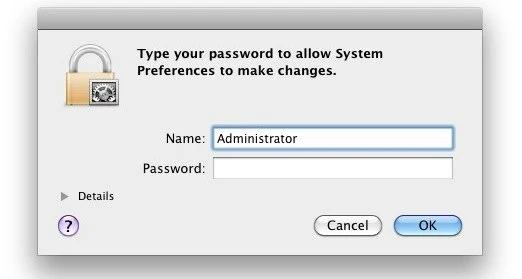
If you see a screen similar to this, it's your operating system asking for your local admin password on your own computer.

1 reply

John Waller
Community Expert
John WallerCommunity ExpertCorrect answer
Community Expert
June 4, 2017

If you see a screen similar to this, it's your operating system asking for your local admin password on your own computer.

Participant
June 4, 2017

Hi John

It's my own name I see. I haven't set up any admin on the Mac. I tried the password I sign in with but had no luck.

C

John Waller
Community Expert
Community Expert
June 4, 2017

The name can be anything. If it's your own name that you sign in with on your own computer then that is correct. You've probably been made administrator by default on your own computer.

If you see the above screen at all then your operating system is asking for your permission to install software on your hard drive.