


Participant
November 24, 2022
Question

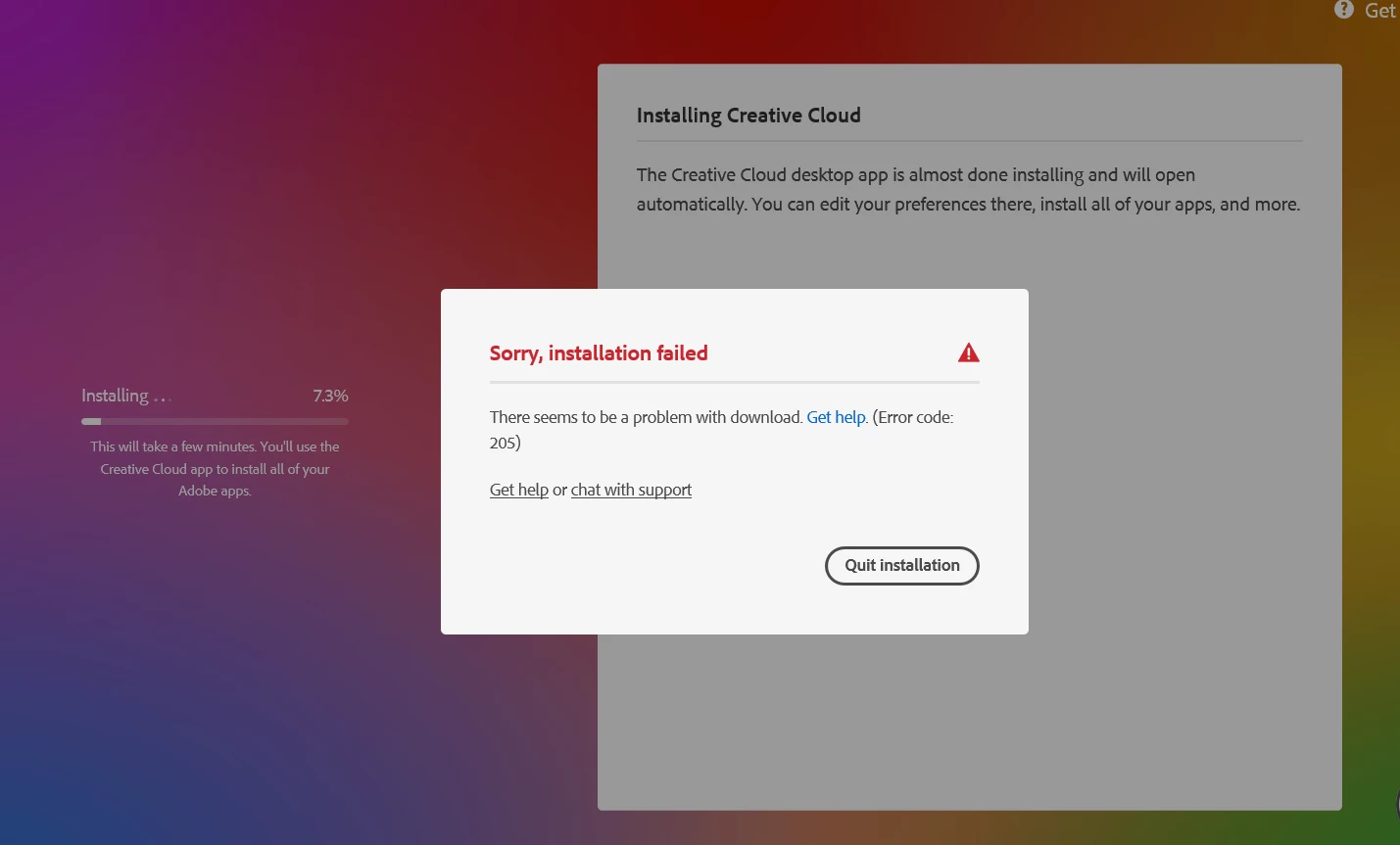
Cant download Creative cloud or illustrator, Error 205

  • November 24, 2022
  • 3 replies
  • 1363 views

I cant download any of the software above, it downloads to about 7% and then error code 205 pops up. I have seen other post about this issue, i have tried the following;

log out

restart 

log in

do cmd for /F "tokens=1,* delims= " %G in ('cmdkey /list ^| findstr /c:"Adobe App "') do cmdkey /delete %H

run as administator 
 

This topic has been closed for replies.

3 replies

Participating Frequently
November 25, 2022
quote

I cant download any of the software above, it downloads to about 7% and then error code 205 pops up. I have seen other post about this issue, i have tried the following;

log out

restart 

log in

do cmd for /F "tokens=1,* delims= " %G in ('cmdkey /list ^| findstr /c:"Adobe App "') do cmdkey /delete %H

run as administator 


By @LISELOTTE27285815ngvu

Hello, @LISELOTTE27285815ngvu 

For information on how to resolve Error 205 please see Error downloading Creative Cloud applications - http://helpx.adobe.com/creative-cloud/kb/error-downloading-cc-apps.html/KantimeHealth.net

kglad
Community Expert
Community Expert
November 24, 2022

first, if you have a non-current os, your default browser must support tls 1.2, https://helpx.adobe.com/x-productkb/multi/eol-tls-support.html


to test your default browser's tls you can use , https://clienttest.ssllabs.com:8443/ssltest/viewMyClient.html


otherwise, https://helpx.adobe.com/creative-cloud/kb/troubleshoot-download-install-logs.html#error205


if that fails to solve the problem, confirm that you can connect to the secure adobe servers by reading, http://helpx.adobe.com/x-productkb/policy-pricing/activation-network-issues.html


do you see both logos after clicking "link"?


if you can and still see a connection error try these steps, https://helpx.adobe.com/download-install/kb/common-network-connectivity-issues.html


if those all fail, white list the adobe network endpoints, https://helpx.adobe.com/enterprise/kb/network-endpoints.html


Zaki McZader
Inspiring
November 24, 2022

Hello,
Please try one of these solutions :
- Disable your Antivirus temporarily and try installing again.
- Sometimes firewalls can block software from accessing the internet, so try configuring your firewall and give the CC App internet access.
- You can try using another internet connection source, that might help as well.
Best of luck.