Legend
August 2, 2019
Question

CC App auto-update error

  • August 2, 2019
  • 1 reply
  • 788 views

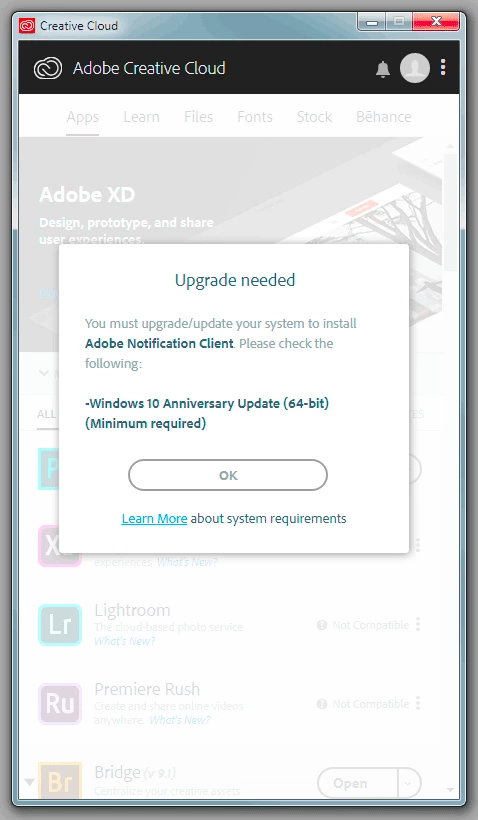
I'm getting this error from the CC App, it shows version 4.0.9.504 installed. Is there a way to disable the unsupported install? Windows 7 Pro on a company computer, no control over upgrading to Windows 10.

This topic has been closed for replies.

1 reply

shawn_starc
Inspiring
August 2, 2019

As you are on work network. I suggest you to contact the admin team of your organization to take care of this issue. As they would have the Admin rights of your system.

https://helpx.adobe.com/in/enterprise/kb/network-endpoints.html

Share this link with them to bypass the server of Adobe by updating proxies

Legend
August 2, 2019

Well, thanks but absolutely none of that answer was correct. Its not a privileges issue, I'm part of the IS team and have both local admin and domain admin logins. And we don't use a proxy server.

If you look at the error... This computer is running Windows 7 and there is a notifier which works with Windows 10 notifications. I'm wondering how to stop the attempt to update the CC App without turning off automatic updates in Preferences. The notifier won't work in Windows 7 which is why the installer reports that it is unsupported.

Even though I'm an admin, I am not going to update this computer to Windows 10 just to eliminate that installation error.

shawn_starc
Inspiring
August 2, 2019

Oh! Sorry.

Open Adobe CCDA > Click on three dots > Preferences > General > Toggle off always keep creative cloud desktop up to date.

You can also toggle off the Notifications option. If you want too

I hope this will work