
Known Participant
April 6, 2018
Answered

cc desktop app - constant restart and failure to download updates

  • April 6, 2018
  • 1 reply
  • 1677 views

For the past month or so the desktop app has constantly restarted or shown the following message
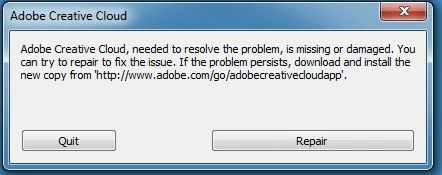
I have hit repair on many occasions. I have tried all solutions suggested on Adobe Creative Cloud, needed to resolve this problem, is missing or damaged but with no success. I have stopped all antivirus software when attempting downloads - no change. I have rebooted my computer numerous times after each clean of the app.

In addition to this when I now try to download the latest updates to Photoshop and Lightroom Classic the download stops at between 4% and 15%. At this point it seems that the app restarts and the app changes back to the Stock page. On the App page everything is reset to show upgrades available.

The download log seems to mention "The windows error code is - 12150" consistently.

I suppose I have two queries:

1) How can I get the desktop app to work and

2) If I can't get it to work, can I somehow download and install the upgrade without it

Thanks,

Paul

This topic has been closed for replies.
Correct answer Bani Verma

Hi Bani,

I have Lightroom Classic CC 7.2 and Photoshop CC 19.1.2 installed, both of which I use almost daily. These are what I am trying to update. I would not be prepared to uninstall these as, with the current problem with the CC desktop app, I'm not confident I would ever be able to reinstall them.

Is there not someway to download the updates other than through the desktop app?

Paul


Unfortunately no Paul, to update these apps you will require the CC Desktop app.

I would suggest that you contact our Phone/Chat support team directly as they can hop on a remote session to troubleshoot this further.

Click here: Contact Customer Care.

Let us know if you have any questions.

1 reply

Bani Verma
Legend
April 6, 2018

Hi Paul,

I understand your concern, you have been trying to install and update Creative Cloud apps, however the desktop app is not working and it throws an error "Adobe Creative Cloud, needed to resolve this problem, is missing or damaged".

To resolve this issue, I would recommend you to perform a manual cleanup of the Creative Cloud desktop app by following the steps given here: Photoshop Installation Failed

After this use the direct download links given here: Download Creative Cloud desktop app , to download and the install the Creative Cloud desktop app.

Let us know if this helps.

kloedenAuthor
Known Participant
April 7, 2018

Hi Bani,

Thanks for the quick response. Unfortunately I followed your suggestion, but no avail. The problem continues to persist.

Upgrading Lightroom got to 6% before stopping, the desktop app moving to the Stock page. Updating Photoshop got to 10% before the same. Then the message to repair appeared. I repaired the desktop app and tried again. Once more the Lightroom update got to 6%.

I must confess to being very frustrated with this. Previous updates were installed without any problem. My computer is exactly the same. Yesterday I spent close to 5 hours trying to find a solution. Another hour today. Surely there is some way to obtain the upgrades other than through the desktop app which doesn't work.

Cheers,

Paul

kloedenAuthor
Known Participant
April 12, 2018

Hi Bani (or anyone else),

This problem continues. The desktop app continually requires repair and still refuses to upgrade my lightroom and photoshop - despite repairing it, using the cleaner tool etc

I feel as if I am paying an ongoing monthly subscription for software which I will never be able to update.

As there appears to be no way of getting the app to work, there must surely be some way to download the updates independent of the app.

Paul