
CC Desktop Shows Install at 90% but App is Installed
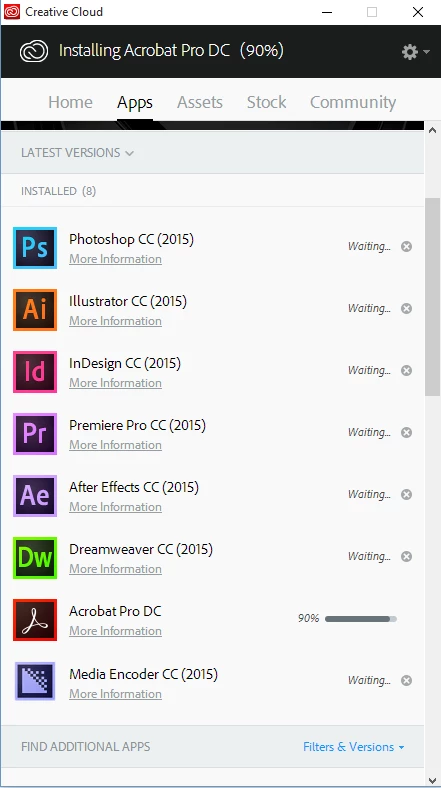
I installed Windows 10 about a week ago. Ever since, I haven't been able to use the CC Desktop App to install/update my apps. The App tab just spins (loading). I tried all the fixes involving removing the db file in the OOBE folder but nothing worked. Finally I used the CC Cleaner Tool to remove ALL of my Adobe programs then I uninstalled the CC Desktop App, restarted my computer and installed it again. The App tab loaded this time but when I tried to install all my software again it stalled at 85% on Photoshop (the first app I tried to install) - I left it for 20 hours with no interruption to the internet connection. I tried quitting the CC Desktop App and starting it again only to have the App tab just spin again. I went through the whole process again with the cleaner tool but this time I started with Acrobat DC instead of Photoshop. Now the CC Desktop App shows Acrobat DC at 90% (it's been that way for the last 3 hours - see screenshot below), however, Acrobat DC is installed. I can open it and it works fine. So now my problem is, how to get it to install other apps if the Desktop App thinks it's still trying to install DC. I'm almost afraid to quit the CC Desktop App for fear that the App tab won't load again.
There haven't been any error messages and the logs for the DC install show that it completed successfully.
I'm on Windows 10 Home 64 bit.
 AdChoices