성우강6609313
Participant
November 4, 2015
Answered

CC Download Problem

  • November 4, 2015
  • 1 reply
  • 342 views

I took a plan, which is Student and Teacher Edition (10730300359)

and having download problem.

I had no problem using it for 15 days,

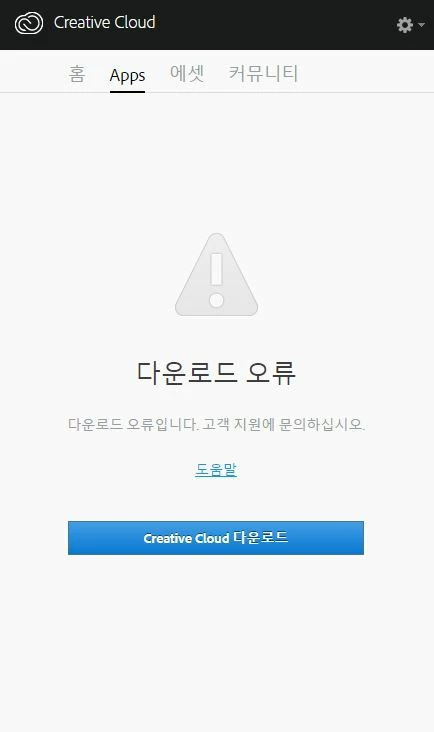
but after, when I run CC, Download error pops out,

and tells me to download the Creative Cloud.

Even I re-download the Creative Cloud, the error still occurs.

Because of this, I can't do anyting in CC. Even running the application.

This pic might help your understanding.

This topic has been closed for replies.
Correct answer Sheena Kaul

Uninstall Adobe Creative Cloud application from Control Panel.

Step 1 :

Open C:drive and navigate to C:\Program Files (x86)\ " Common Files" \Adobe.

Open Adobe folder and delete folders named Adobe Application Manager and OOBE.

Step 2:

Navigate to C:\Program Files (x86)\Adobe.

Open Adobe folder and if present delete Adobe Creative Cloud folder. [**important]

Step 3 :

Press Windows button (located between Ctrl and Alt buttons) along with R button together at a time , you will get a run command window.

Type in below command and hit 'Enter' key.

appdata

Then navigate to Local>Adobe.

Open Adobe folder and delete folders named AAMUpdater and OOBE.

Step 4 :

Click on the blow link and download Adobe Application manager and install the same :

http://download.adobe.com/pub/adobe/creativesuite/cc/win/ApplicationManager9.0_all.exe

Once the installation is completed, double click on Adobe Application Manager launch icon on Desktop.

It will start update process and gets updated to Creative Cloud application .

1 reply

Sheena Kaul
Legend
November 4, 2015

Hi,

I believe you are getting the 'Download error' in the Apps panel.

Please refer to the help document below:

Download Error in Apps tab of Creative Cloud Desktop Application

You may also refer to the threads below:

https://forums.adobe.com/thread/1832357

Creative Cloud - Download error - stubborn error

Re: Creative Cloud "Download Error" message

Regards,

Sheena

성우강6609313
Participant
November 4, 2015

Thanx.

But I'm still having same problem.

The link you gave me couldn't help.

C:\Users\(username)\AppData\Local\Adobe >> (Delete) AAMupdater & (Delete) OOBE

couldn'lt help. I'm using Windows.

Download Error

Download Creative Cloud

Still pops out... How an Earth can I solve this problem???

Sheena Kaul
Sheena KaulCorrect answer
Legend
November 4, 2015

Uninstall Adobe Creative Cloud application from Control Panel.

Step 1 :

Open C:drive and navigate to C:\Program Files (x86)\ " Common Files" \Adobe.

Open Adobe folder and delete folders named Adobe Application Manager and OOBE.

Step 2:

Navigate to C:\Program Files (x86)\Adobe.

Open Adobe folder and if present delete Adobe Creative Cloud folder. [**important]

Step 3 :

Press Windows button (located between Ctrl and Alt buttons) along with R button together at a time , you will get a run command window.

Type in below command and hit 'Enter' key.

appdata

Then navigate to Local>Adobe.

Open Adobe folder and delete folders named AAMUpdater and OOBE.

Step 4 :

Click on the blow link and download Adobe Application manager and install the same :

http://download.adobe.com/pub/adobe/creativesuite/cc/win/ApplicationManager9.0_all.exe

Once the installation is completed, double click on Adobe Application Manager launch icon on Desktop.

It will start update process and gets updated to Creative Cloud application .