
Inspiring
November 2, 2018
Answered

CC file syncing affects Windows

  • November 2, 2018
  • 1 reply
  • 532 views

When I'm drop and  drag files from my local harddrive to the CC files in my file browser it affects Windows in odd manners. This is a grab from my desktop where my apps gets a green checker on them - why? This is the same checker icon that appears on folders in CC files. What's going on?

This topic has been closed for replies.
Correct answer Abambo

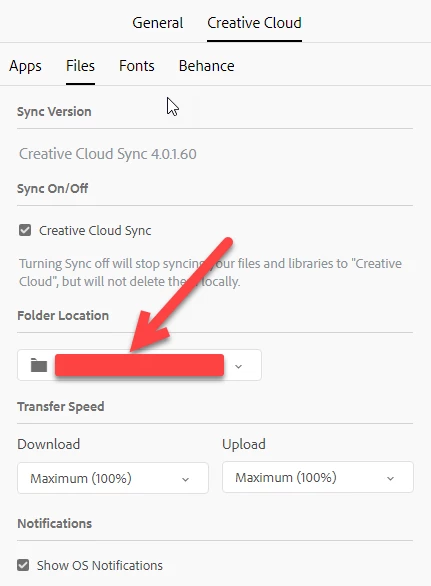
CC syncs what is found in a directory "Creative Cloud Files" and that directory is located where you put it in the CC app preferences:

1 reply

Abambo
Community Expert
Community Expert
November 2, 2018

This is Windows showing that the files have been synced to the cloud. The same icon appears with Dropbox. Microsoft's OneDrive uses a different system, but they allow files to stay off-line, as long as the file is not used.

Why your desktop changes the icons is, however, one of the Windows mysteries to me. I simply suppose that it is an appreciation error with Windows.

Why do your pass through the web to drop files to the cloud?

ABAMBO | Hard- and Software Engineer | Photographer
perrybrusAuthor
Inspiring
November 2, 2018

If I upload trough the CC UI my XD files gets zipped and I don't want that. I want to be able to have native file format intact and only way to do that is to copy files from local machine to local CC file directory in file browser.

That syncing feature in CC is not very stable. The CC installer stated that it was syncing over a hundred thousand files! Jisses. I haven't decided to sync my whole raid disk setup.  I turned the whole creative cloud sync OFF as it didn't sync the files I had shared onto CC, it was massively trying to sync my whole setup of three hard drives. Why I also get sync icons on my windows desktop icons is also quite odd. No matter what I do (local CC UI upload or copy via files browser) it takes forever, even for a small 9mb file. My computer is fast and I have 100/100 fiber full duplex. So I guess CC is very redundant.

Abambo
Community Expert
AbamboCommunity ExpertCorrect answer
Community Expert
November 2, 2018

CC syncs what is found in a directory "Creative Cloud Files" and that directory is located where you put it in the CC app preferences:

ABAMBO | Hard- and Software Engineer | Photographer