Participant
April 12, 2020
Answered

CC not compatible on Mid 2010 Macbook pro

  • April 12, 2020
  • 3 replies
  • 2468 views

Hi there, I am working from home and using an old mid 2010 Macbook pro running OS X EI Capitan version 10.11.6.

I tried to install Adobe CC to my Mac and they showed "not compatible" on Creative Cloud app. My Mac cannot update the system anymore. Please help.
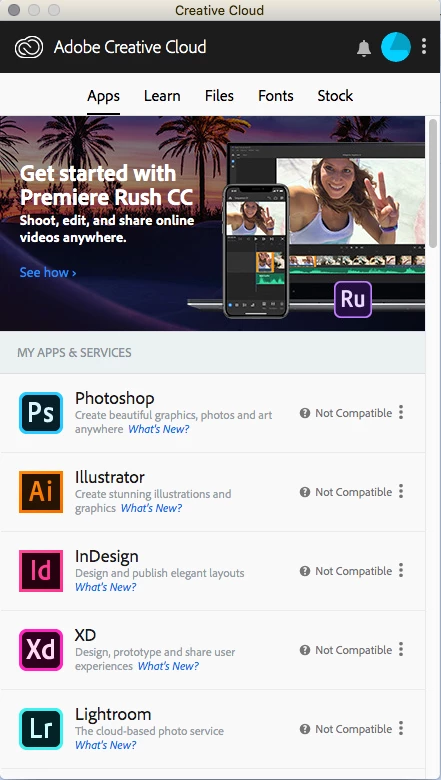
 

This topic has been closed for replies.
Correct answer Just Shoot Me

You need to Upgrade the OS. That version Mac should be able to run 10.12.x or even 10.13.x.


Here you go.


https://osxdaily.com/2017/06/06/macos-high-sierra-compatibility-list/

3 replies

Jeff Arola
Community Expert
Community Expert
April 13, 2020

If your MacBook Pro has a standard hard drive, probably a 5400 rpm one at that, replacing that drive with a ssd can make it seem like you have a brand new computer and also upgrading the ram to at least 8 gb can make a difference as well, but not near as much as an ssd will.

Nancy OShea
Community Expert
Community Expert
April 12, 2020

Please ensure your computer meets or exceeds the minimum system requirements to run Creative Cloud + all other apps you intend to use.  Min-requierments vary by product and platform.
https://helpx.adobe.com/creative-cloud/system-requirements.html


()__()
(='.'=)
(")_(")


Nancy O'Shea— Product User & Community Expert
Just Shoot Me
Just Shoot MeCorrect answer
Legend
April 12, 2020

You need to Upgrade the OS. That version Mac should be able to run 10.12.x or even 10.13.x.


Here you go.


https://osxdaily.com/2017/06/06/macos-high-sierra-compatibility-list/

Mau ChengAuthor
Participant
April 13, 2020

Thanks!

Just realize you cannot update your OS via APP store, but need to search on apple website to get OS 10.13.
Successfully downloaded and updated my OS to 10.13.6. It's a bit slow on everything comparing to old OS but it WORKSSSS!!!

If anyone has the same issue as me, you can try upgrade your OS to 10.12 and give it a go. Maybe your MAC will run faster.


Thanks again!