Answered

This topic has been closed for replies.
I appreciate your trying to help, but nothing seems to work. I decided to
uninstall Adobe Cloud and Lightroom CC. Let me know if you ever have
Lightroom Classic CC that installs in English, no matter what country you
live in. I wanted so much to use it with LRTimelapse.
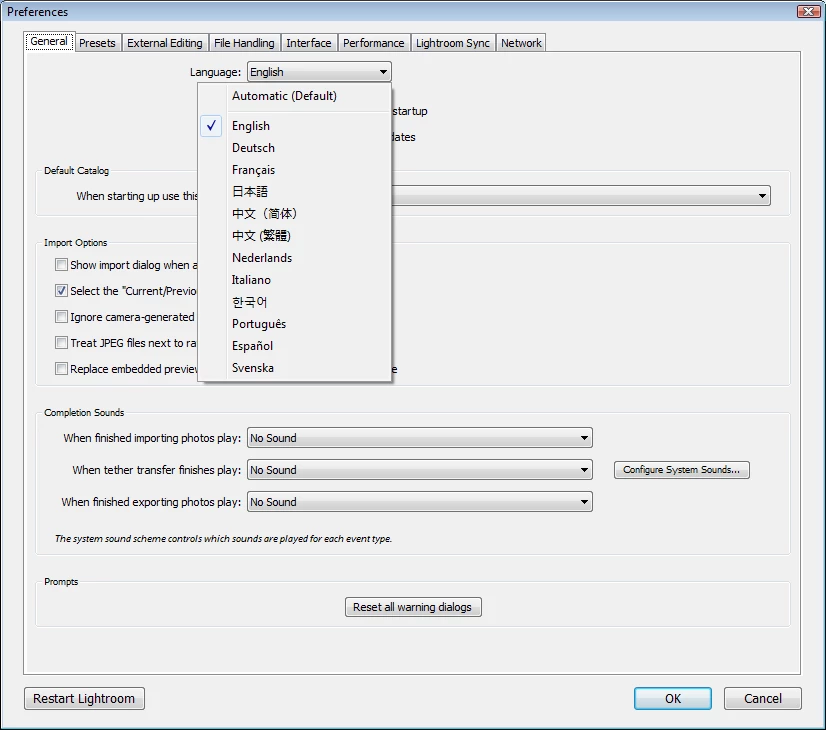
Lightroom has its own language settings that work independently of the language setting in the CC desktop app.
Reinstall Lightroom, and if it's still in Japanese, press Ctrl + comma, which will open the preferences.
The language setting is at the top of the first tab.
Choose English, then click Restart Lightroom.
Sign up
Already have an account? Login
To post, reply, or follow discussions, please sign in with your Adobe ID.
Sign inSign in to Adobe Community
To post, reply, or follow discussions, please sign in with your Adobe ID.
Sign inEnter your E-mail address. We'll send you an e-mail with instructions to reset your password.
 AdChoices