Participant
June 24, 2013
Answered

Change language preferences

  • June 24, 2013
  • 2 replies
  • 498 views

I would like to change my menu to spanish. How can i do that? I have a subscription to indesign running in english.

    This topic has been closed for replies.
    Correct answer Sumit Singh7733893

    For this purpose you first need to change the lanuage of Operating System to Spanish and

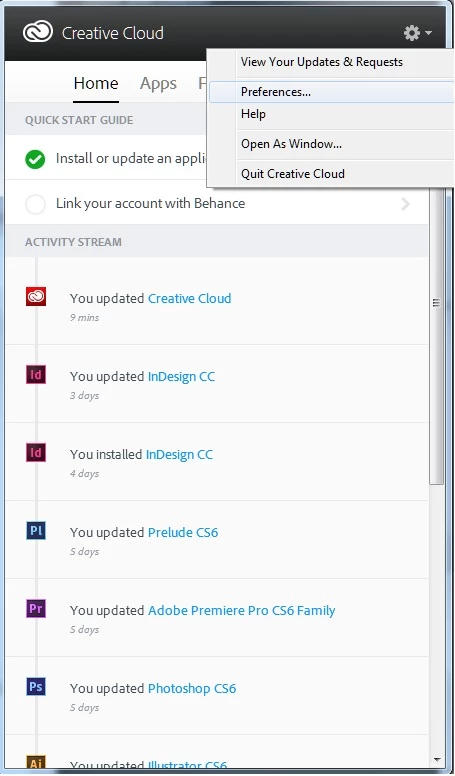
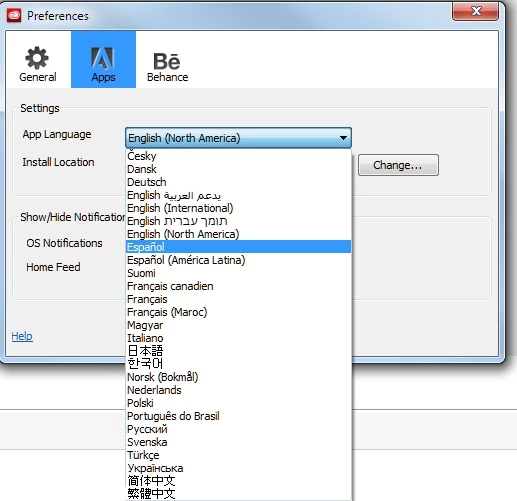
    need to setup the "App Language" to Spanish from Creative Cloud Desktop app Preferences under "Apps" tab.
    2 replies

    Sumit Singh7733893
    Sumit Singh7733893Correct answer
    Participating Frequently
    June 24, 2013

    For this purpose you first need to change the lanuage of Operating System to Spanish and

    need to setup the "App Language" to Spanish from Creative Cloud Desktop app Preferences under "Apps" tab.

    JatinDembla
    Participating Frequently
    June 24, 2013

    Please launch Creative Cloud Desktop application and go to setting (available on top right hand side), In setting you will get the option to change the installer language of the software select the langauge in which you want to install the software and apply the setting.

    After applying the setting you can install the software in the selected the lanuage.

    Regards,

    Jatin Dembla