Known Participant
October 15, 2018
Answered

Change order shortcuts A.C.C.

  • October 15, 2018
  • 1 reply
  • 576 views

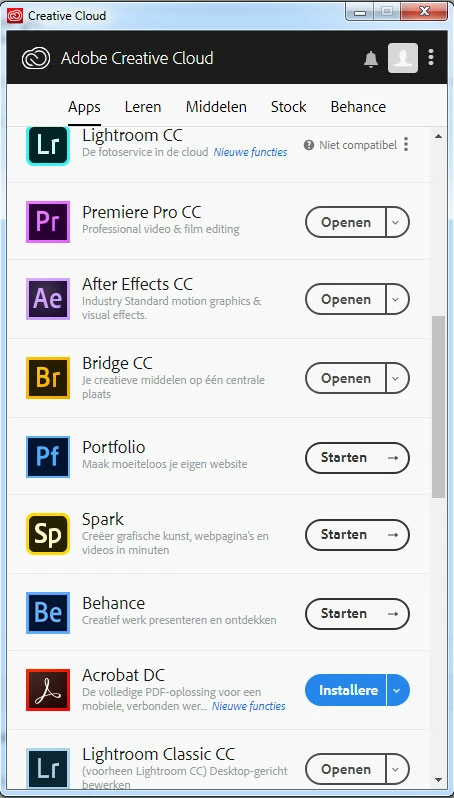
I was wondering if it's possible to change the order of these shortcuts?

I can see 9 shortcuts and would like to see the 9 which I most use.
This topic has been closed for replies.
Correct answer AxelMatt

I think there's no possibility to sort the entries in the list at the moment.

You can try to create a feature request. Maybe Adobe will build this feature into one of the future versions, if there is a lot of interest.

Feature Request/Bug Report Form

1 reply

kglad
Community Expert
Community Expert
October 15, 2018

you can click the installed apps link at the top of the apps panel,

AppelmoesAuthor
Known Participant
October 16, 2018

Thanks kglad, but I don't think that's the answer I was looking for.

What I meant was, how can I get Photoshop on top, Bridge second, Camera Raw third, etc. etc.

AxelMatt
Community Expert
AxelMattCommunity ExpertCorrect answer
Community Expert
October 16, 2018

I think there's no possibility to sort the entries in the list at the moment.

You can try to create a feature request. Maybe Adobe will build this feature into one of the future versions, if there is a lot of interest.

Feature Request/Bug Report Form

My System: Intel i7-8700K - 64GB RAM - NVidia Geforce RTX 3060 - Windows 11 Pro 25H2 -- LR-Classic 15 - Photoshop 27 - Nik Collection 8 - PureRAW 5 - Topaz Photo
