


Participating Frequently
May 18, 2022
Question

cloud update error, windows 10

  • May 18, 2022
  • 1 reply
  • 191 views

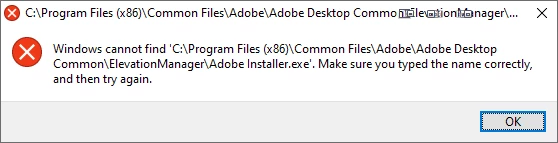
Today the Creative Cloud started asking for an update.  When I run the update it gets to 2% and stops with the attached error message.  I've rebooted and tried again several times with the same results.  Windows 10.
This topic has been closed for replies.

1 reply

Jeffrey_A_Wright
Community Manager
Community Manager
May 18, 2022

YagoDragon, the error message indicates a required file was removed from the computer.  Was any disk utility or clean-up software recently run on the computer running Windows 10?


Please follow the solutions listed in https://helpx.adobe.com/creative-cloud/kb/creative-cloud-missing-damaged.html to repair or remove the Creative Cloud desktop app.  Please update this public forum discussion if you encounter any error messages or have questions about the four listed solutions.

Participating Frequently
May 18, 2022

No on the cleanup, closet thing would be that my anti-virus (webroot) also wanted to update and I did that first.  If I uninstall/reinstall creative cloud do I need to do the same with photoshop, lightroom, etc?


Jeffrey_A_Wright
Community Manager
Community Manager
May 18, 2022

It is impossible to say if you will need to reinstall Photoshop and Lightroom CC, YogaDragon.  The error message only indicates that one file is missing; hopefully, no additional files were damaged or removed from the computer.