Inspiring
April 12, 2018
Answered

Colour problems - Help!
  • April 12, 2018
  • 4 replies
  • 343 views

Latest version of Premiere CC.

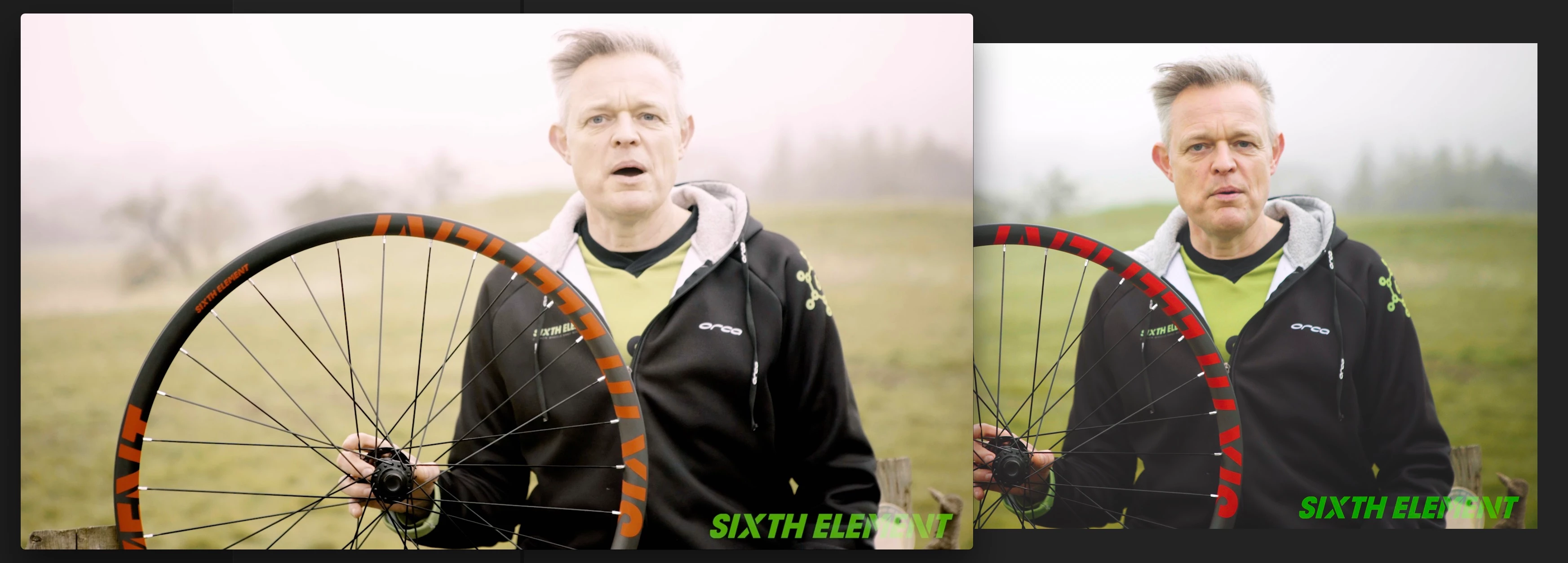
On the right is my program monitor, on the left is the video once it's been exported using the Facebook Preset. Look how the colours have changed. It's got a pink tint and the colours are all washed out. For the same project I've exported for the client using the built in Youtube and Twitter profiles and exactly the same happens. When I upload it to Facebook/Youtube the colours stay the same as the washed out video.

It's awful, I can't deliver these.

What is going on and how can I fix it?

Many thanks

This topic has been closed for replies.
Correct answer cmjdavies

For anyone else who might share my issue, here's a really helpful thread which covers this really unhelpful issue.

P3 color gamut of the iMac display (Retina, Late 2015)

I've downloaded the LUT which you have to remember to turn off before you export but it does form some sort of workaround.


To try and understand what's going on, Premiere isn't allowing for the bright saturated iMac screen. Well, that's how I understand it anyway.

4 replies

Legend
April 12, 2018

Yes it is. If this is a high gamut monitor that’s exactly how it is, by design, for everyone.

cmjdaviesAuthorCorrect answer
Inspiring
April 12, 2018

For anyone else who might share my issue, here's a really helpful thread which covers this really unhelpful issue.

P3 color gamut of the iMac display (Retina, Late 2015)

I've downloaded the LUT which you have to remember to turn off before you export but it does form some sort of workaround.


To try and understand what's going on, Premiere isn't allowing for the bright saturated iMac screen. Well, that's how I understand it anyway.

Legend
April 12, 2018

View them on a regular monitor.

cmjdaviesAuthor
Inspiring
April 12, 2018

Anyone care to chip in with anything more helpful? Changing monitor isn’t going to solve the fact that the exported film is a different colour than the program monitor when viewed on the same screen at the same time.

Legend
April 12, 2018

No, this is normal if one app (the Adobe app) is colour managed. Only they can show colour right. You don't tell us which two apps you are using. If they are both Adobe apps, this is a different story.

cmjdaviesAuthor
Inspiring
April 12, 2018

I’m editing in Premiere CC latest version. The picture on the right.

on the left is how it looks in QuickTime (and also Facebook/YouTube when I upload it)

How can i make sure that wgat gets expoported looks the same as how I coloured it in Premiere?

Legend
April 12, 2018

Do you have a high gamut monitor? If not sure, exactly what monitor? If it's high gamut, this is expected.

cmjdaviesAuthor
Inspiring
April 12, 2018

It’s a 5k imac 27in

If it was the monitor wouldn’t it affect both clips? The picture above is them on screen at the same time