



jonnyguitar88
Known Participant
March 17, 2021
Question

Continuous CC repair message

  • March 17, 2021
  • 1 reply
  • 545 views

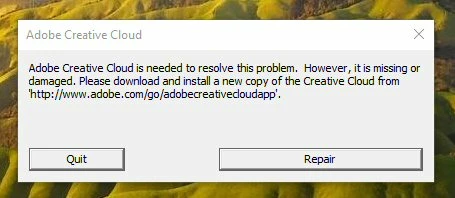
Hi All, I am getting a message evryday saying that CC needs to be reinstalled. I have been on with support twice now, done a clean uninstall and reinstall twice, but still getting the maessage as attached. Any ideas? Thank you

John
This topic has been closed for replies.

1 reply

kglad
Community Expert
Community Expert
March 17, 2021

something on your computer (eg, av, antimalware, cleaner, defragger etc) is corrupting your cc files.


before a clean reinstall, try resetting and then repairing:


first, reset the cc app:

to reset the cc desktop app, make sure it's in the foreground, then press:

Win: Ctrl + Alt + R
Mac: Cmd + Opt + R

if that fails, try to repair
https://helpx.adobe.com/download-install/kb/creative-cloud-install-stuck.html

if that fails go ahead and uninstall/reinstall per the above link

if that fails, do a clean cc install following each applicable step:

uninstall every cc app including preferences, https://helpx.adobe.com/creative-cloud/help/uninstall-remove-app.html
then uninstall the cc desktop app, https://helpx.adobe.com/creative-cloud/help/uninstall-creative-cloud-desktop-app.html
clean your computer of cc files per http://www.adobe.com/support/contact/cscleanertool.html
check for, and if available, update your os
repair all ms visual c++ versions that can be repaired.
update your ms visual c++, if it can be updated
restart your computer (don't skip this)
reinstall the cc desktop app, https://helpx.adobe.com/uk/download-install/kb/creative-cloud-desktop-app-download.html
if you're unable to install the cc desktop app at this stage, use the link at the bottom of the page at https://helpx.adobe.com/uk/download-install/kb/creative-cloud-desktop-app-download.html
use the desktop app to install your cc programs/trials

jonnyguitar88
Known Participant
March 17, 2021

Thank you for that, lots to try there. I had cleaned the CC installation to remove all trace, but have not uninstalled all apps.

kglad
Community Expert
Community Expert
March 17, 2021

i'm not sure how you did that because you shouldn't be able to uninstall the cc app without first uninstalling cc programs.


and if you run the cleaner without uninstalling first, you're causing more problems.