



swrutherford
Inspiring
August 26, 2022
Answered

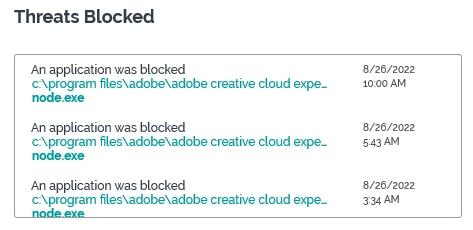
Corporate Threat Detection keeps flagging Creative Cloud file

  • August 26, 2022
  • 2 replies
  • 507 views

C:\program files\adobe\adobe creative cloud experience\libs\node.exe

This file keep getting flagged/blocked by my company's threat detection software, CarbonBlack. Windows 10, Creative Cloud info below:
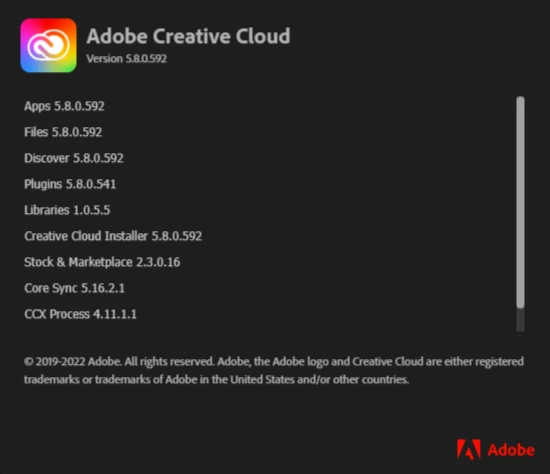
The only thing that wasn't able to be seen here is CC Libraries 30.20.7.4.

Any guidance to either disabling this or how to get the CarbonBlack system to no longer see this as a threat is appreciated.
 

This topic has been closed for replies.
Correct answer Lumigraphics

Node is a free JavaScript environment that is (to say the least) widely used. Any security program should recognize and allow this. Your network administrators need to open a support ticket with the vendor of your security software.

https://community.carbonblack.com/t5/Knowledge-Base/CB-Defense-Node-Application-is-Blocked-Despite-Permission-Rules/ta-p/78786

https://community.carbonblack.com/t5/Knowledge-Base/CB-Defense-Script-files-being-blocked-despite-permission-rules/ta-p/87957


2 replies

Nancy OShea
Community Expert
Community Expert
August 26, 2022

It's caused by an overzealous setting in CB Defense and a known issue.  See below for more details.

https://community.carbonblack.com/t5/Knowledge-Base/CB-Defense-Node-Application-is-Blocked-Despite-Permission-Rules/ta-p/78786


Nancy O'Shea— Product User & Community Expert
LumigraphicsCorrect answer
Legend
August 26, 2022

Node is a free JavaScript environment that is (to say the least) widely used. Any security program should recognize and allow this. Your network administrators need to open a support ticket with the vendor of your security software.

https://community.carbonblack.com/t5/Knowledge-Base/CB-Defense-Node-Application-is-Blocked-Despite-Permission-Rules/ta-p/78786

https://community.carbonblack.com/t5/Knowledge-Base/CB-Defense-Script-files-being-blocked-despite-permission-rules/ta-p/87957


swrutherford
Inspiring
August 26, 2022

Thank you! I will bring this to their attention.

Stephen