
Participant
March 28, 2018
Answered

Creatice Cloud desktop panel shows old apps

  • March 28, 2018
  • 2 replies
  • 430 views

Why is my Creative cloud desktop panel showing old apps. Although it seems that CC desktop panel is up to date, my apps isn't.
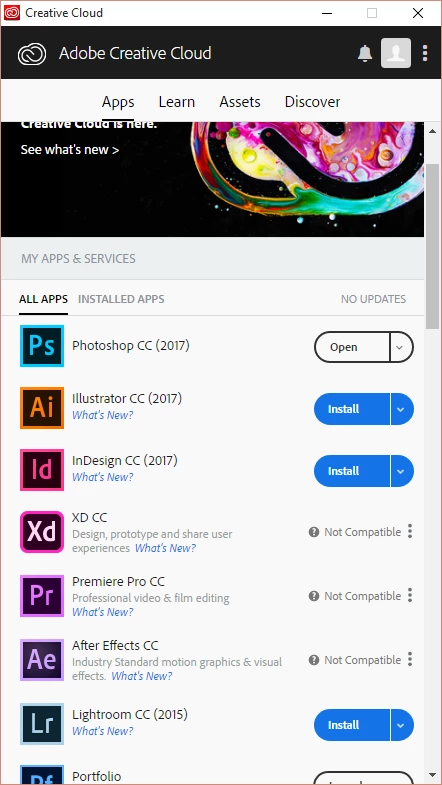
I have Windows 10 installed and have no problem installing apps that are on panel. But some of apps, as you can see, says are not compatible, other are not up to date (Lightroom CC 2015????).

This topic has been closed for replies.
Correct answer Kanikas

Hi Edgar,

In addition to details shared above, please see the link to know about the minimum system requirements needed to run Creative Cloud:

Adobe Creative Cloud system requirements

Hope this helps! Feel free to update the thread for more questions.

Thanks

Kanika

2 replies

Kanikas
KanikasCorrect answer
Legend
March 28, 2018

Hi Edgar,

In addition to details shared above, please see the link to know about the minimum system requirements needed to run Creative Cloud:

Adobe Creative Cloud system requirements

Hope this helps! Feel free to update the thread for more questions.

Thanks

Kanika

kglad
Community Expert
Community Expert
March 28, 2018

you need a 64 bit os.