Participating Frequently
January 4, 2019
Answered

Creative Cloud 2017 update

  • January 4, 2019
  • 2 replies
  • 392 views

Hello

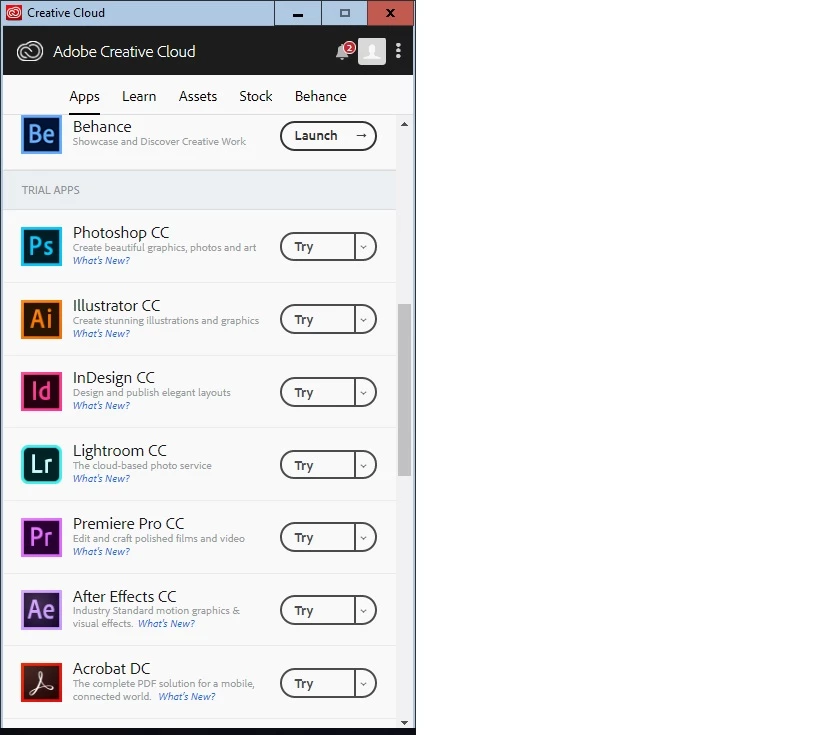
I am trying to find update files for Creative Cloud as we have it on multiple devices at our school. Please see attached. Having logged into the Creative Cloud desktop app there are no update files only trials. Can you please tell me where I can get the update files?

Many Thanks

Jason

St Bedes

This topic has been closed for replies.
Correct answer kglad

check your account to verify your subscription is what you expect and to verify your adobe id (used in the next step), https://accounts.adobe.com/

if your account shows

a. your subscription is active,

1.  sign out and then back in to your cc desktop application using the same adobe id above to verify your subscription:  http://helpx.adobe.com/creative-cloud/kb/sign-in-out-creative-cloud-desktop-app.html

2.  if that fails, https://helpx.adobe.com/manage-account/kb/stop-creative-cloud-trial-mode-after-purchase.html

3.  if that fails, https://helpx.adobe.com/creative-cloud/kb/cc-reverts-to-trial.html

4.  if that fails, using a browser that allows popups and cookies,  contact adobe support during pst business hours by clicking here and, when available, click 'chat', http://helpx.adobe.com/x-productkb/global/service-ccm.html

if your account shows

b. you have no subscription and you're paying for one

1. using a browser that allows popups and cookies,  contact adobe support during pst business hours by clicking here and, when available, click 'chat', http://helpx.adobe.com/x-productkb/global/service-ccm.html

[moved from Creative Suites to Creative Cloud Download & Install]
2 replies

Ned Murphy
Legend
January 4, 2019

This forum is for Creative Suites discussions, not Creative Cloud.  Your other posting in the Creative Cloud Download and Install forum is the better place for it.

kglad
Community Expert
kgladCommunity ExpertCorrect answer
Community Expert
January 4, 2019

check your account to verify your subscription is what you expect and to verify your adobe id (used in the next step), https://accounts.adobe.com/

if your account shows

a. your subscription is active,

1.  sign out and then back in to your cc desktop application using the same adobe id above to verify your subscription:  http://helpx.adobe.com/creative-cloud/kb/sign-in-out-creative-cloud-desktop-app.html

2.  if that fails, https://helpx.adobe.com/manage-account/kb/stop-creative-cloud-trial-mode-after-purchase.html

3.  if that fails, https://helpx.adobe.com/creative-cloud/kb/cc-reverts-to-trial.html

4.  if that fails, using a browser that allows popups and cookies,  contact adobe support during pst business hours by clicking here and, when available, click 'chat', http://helpx.adobe.com/x-productkb/global/service-ccm.html

if your account shows

b. you have no subscription and you're paying for one

1. using a browser that allows popups and cookies,  contact adobe support during pst business hours by clicking here and, when available, click 'chat', http://helpx.adobe.com/x-productkb/global/service-ccm.html

[moved from Creative Suites to Creative Cloud Download & Install]