Just for confirmation , enable Root user account and login to same and try to launch Adobe Creative Cloud app and check . We can disable it later .
Let us know if you are able to launch the app or not .
Step for enabling Root user account :
OS X Mavericks: Enable and disable the root user
(Applies for Yosemite / El Capitan as well)
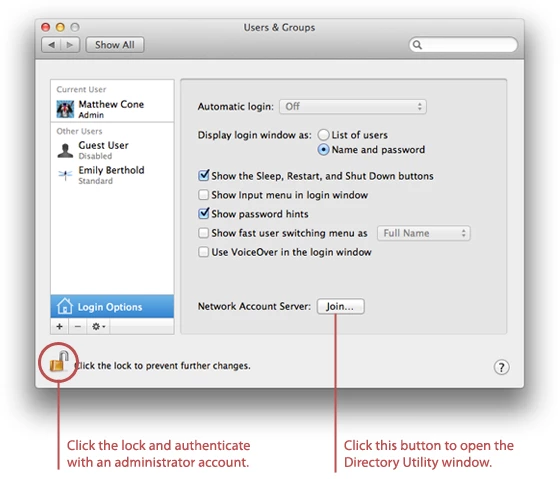
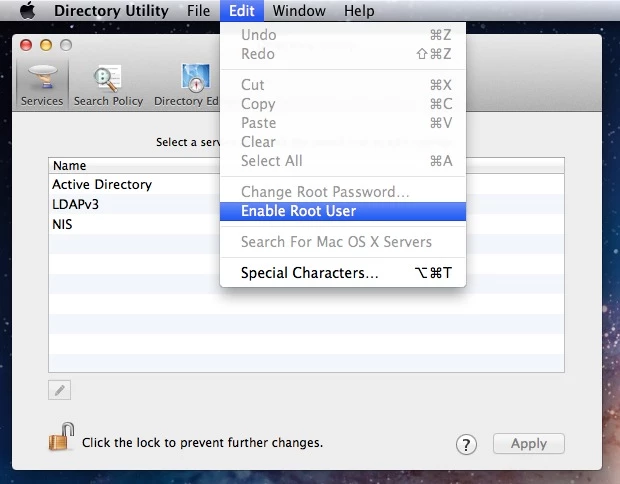
How to log in as root
- If you are logged in, choose Log Out from the Apple menu.
- If you are logging in from a list of usernames with pictures, click Other.
- In the Name field, type: root
- In the Password field, type the password you defined when setting up the root user account.
.jpg)
Once you logged in to Root Account try to launch Creative Cloud app and check.


.jpg)
 AdChoices