


Participant
April 21, 2015
Answered

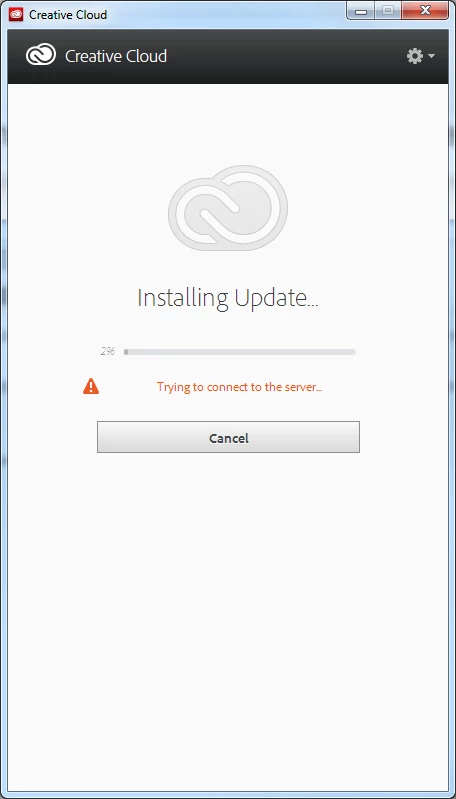
Creative cloud app: Installing update: stuck at 2% Message "trying to connect to server"

  • April 21, 2015
  • 3 replies
  • 13036 views

I've flushed all my browsers cache, Uninstalled the app and re-installed it, cleaned the hosts, checked every single thread available with the same problem... none are solved.
web-fonts won't sync until the update happens so I cant really work.  This is a really big problem for me.  The screen capture below is my creative cloud window for the last 4 hours

I'm on windows 7 home premium v 6.1 service pack 1
This topic has been closed for replies.
Correct answer Sheena Kaul

Kindly refer to Connecting to CC - Stuck on 'Installing update..'

3 replies

Participant
March 23, 2021

You can try disabling your VPN if you have one. I couldn't update until I turned it off to let it update. 

Participant
February 9, 2022

This worked!!!

Participant
July 29, 2015

I have been getting the exact same screen as mincho33 for awhile now.   Apparently not a lot of people are having this issue, but the ones that are have not, not that I have found, gotten an answer/solution to this specific problem.  The only way I have gotten around it is to find the latest Creative Cloud Desktop App online, download, and reinstall.  That takes a lot more time than letting the app do it on its own like it is supposed to.

The link supplied by Sheena is appreciated, but did not relate to this specific issue.  Unless I missed something (possible) and if so please show me exactly where it deals with connecting to the server after already being signed in.

Like the link above suggested, I did go to an app, Premiere Pro, to sign in and it said I was already signed in.

I also set Creative Cloud Desktop App to "Run as Administrator" with no change.

The big problem is that once it gets locked into this updating mode, there is not a way to cancel it and get back to the old app version to let me update Adobe products or mincho33 use the fonts.  I can use Premiere, After Effects, etc... but not update them through the app.  I do not use the Fonts at this point but apparently the app has to be running in order to use them according to mincho33.  For me right now it is a big annoyance but for others it seems to be a work stopper.

So I am not sure any of my input has helped Adobe in understanding the issue and I am glad to answer any questions to help get this solved.

Thanks

Sheena Kaul
Community Manager
Sheena KaulCommunity ManagerCorrect answer
Community Manager
July 29, 2015
lanel81204281
Known Participant
May 31, 2017

not useful

links are dead and it's not the same problem

Sheena Kaul
Community Manager
Community Manager
April 21, 2015

Hi,

Please refer to the help document below:

Creative Cloud Connection Update

Regards,
Sheena

dario1133Author
Participant
April 21, 2015

Sheena,
The link you sent me is not helpful. How can I access my synced fonts so that I can keep working????
