


Creative Cloud Cleaner Tool problem.
I needed to remove all Adobe Products from one computer in order to run another program effeciently (Pro Tools), and move my Adobe Plans to my laptop. I explain what I needed to the agent and he emailed me the link to the CC Cleaner tool. It completed but "with errors". Now, at startup I'm greeted with this lovely message:
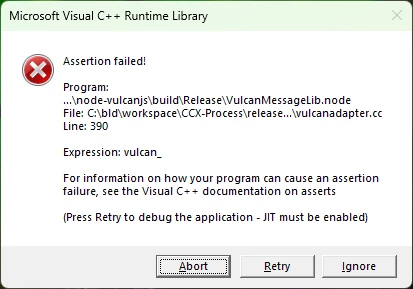
I went ahead & installed my new program, but it won't open. I don't know how, but I'm sure it has something to do with using the cleaning tool. I read a post with a similar issue, and the answer given said that the uninstall should've been used, and the cleaner used to clean up any remaining "bits". I wish the agent would've told me that, however at this point I just need a solution. I'm hoping that someone can please help me out with this. I've never had ANY issues with my computer before this. Thanks in advance for any guidance provided.
 AdChoices