Known Participant
September 1, 2017
Question

Creative Cloud Desktop App Update Error - Error code 146

  • September 1, 2017
  • 2 replies
  • 1024 views

I am getting the following error when trying to update the CC Desktop App.  I have followed the link to learn about error 146, and viewed the log file. (log file info below)
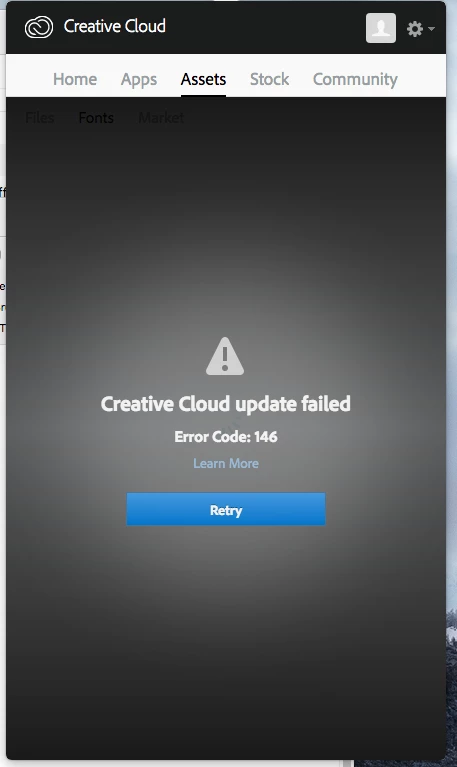
The log file output shows the following:

FATAL: Error (Code = 146) executing in command 'MoveDirectoryCommand' for package: 'CoreSync-mul', version:2.4.2.61

FATAL: Error occurred in install of package (Name: CoreSync-mul Version: 2.4.2.61). Error code: '146'

WARN: Failed to move directory '/.adobeTemp/2BA46992-11BE-4890-9553-00CFF1E777F9/1/CoreSync' to '/System/Library/Perl/Extras/5.18/darwin-thread-multi-2level/DBI/DBD/SqlEngine/CoreSync'

The Adobe support team have suggested it's to do with permissions - but I have never had an issue before, nor have I changed any permissions.  I am logged in as an admin.  Any ideas what to do next ?

This topic has been closed for replies.

2 replies

kglad
Community Expert
Community Expert
September 1, 2017

please don't open duplicate threads.  i unlocked this thread per your request but you can already see you're just going to get the same advice you got before.

in any case, you can get the same advice and maybe other help here but then please stop posting on the other thread which deals with the same issue.

Bani Verma
Legend
September 1, 2017

Hi lkjlkjh,

Sorry that you are having trouble using your Adobe Creative Cloud desktop app, You've mentioned that you are getting Error Code 146 while updating the desktop app, For details on how to resolve Error Code 146 see Resolve Error Code 146 encountered while installing Creative Cloud desktop apps... .

You are welcome to update this discussion if you have any questions regarding the steps listed in the document.

Known Participant
September 1, 2017

Thanks Bani Verma - and yes I did speak with an Adobe support rep earlier today, and they also provided a link to the Resolve Error Code 146 or 147 encountered while installing Adobe Creative Cloud desktop apps. page.  However this has not resolved my issue.  Going through each of the solutions on this page, I have done the following (in case you can see I am doing something wrong)

From this page of solutions

Upgrade to the latest version of the Creative Cloud desktop application

Yes I always run the latest the latest version, and this error 146 is showing up during an update to the latest version of the desktop app

Temporarily disable antivirus or security software

I do not have any antivirus software installed

Manually create the required directory

The directory referred to in my log file already exists /System/Library/Perl/Extras/5.18/darwin-thread-multi-2level/DBI/DBD/SqlEngine/CoreSync

Verify file permissions

I have full admin permissions.  I have also tried running the CC Desktop app update using alternative Admin user accounts.  i have even enabled ROOT and tried running the CC Desktop app update under that user account.  but still same error.

So as you can see I have already contacted ADOBE support, and I have exhausted all of the guidance provided in the solutions page you have linked to.  Hopefully someone else can proivide some other suggestions?  Thanks again

Govardhan.V
Participating Frequently
September 1, 2017

What is the current version of Adobe Creative Cloud app?

Have you tried uninstalling and reinstalling Adobe Creative Cloud app? If not you may try once.

Download Creative Cloud desktop app