
Question
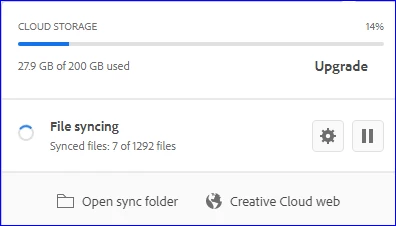
Creative Cloud "File Syncing" at 7 of 1292 for 12 hours
I've had issues with Creative Cloud syncing taking over my machine for hours at a time -- high CPU and blocked processes in Explorer. I had paused syncing a week or two ago (so I could actually get some work done), and un-paused syncing a couple days ago. It now seems stuck at "file 7 of 1292" for no apparent reason. I've rebooted, same thing happens.
I looked in Process Explorer for file handles open by Creative Cloud.exe - nothing on my 😧 drive, where my Creative Cloud folder is located... as well as all executables from Adobe. Nothing is being opened on my 😧 drive... and there's no progress being made since yesterday at 6pm:
Any ideas?
Thanks,
Ray - the Old Desert Lizard
 AdChoices