Participant
March 2, 2018
Answered

Creative Cloud Hangs at 2% Update

  • March 2, 2018
  • 2 replies
  • 356 views

I have tried all the fixes specified in your forums (Cleaner, Re-install) and it won't get past this stage
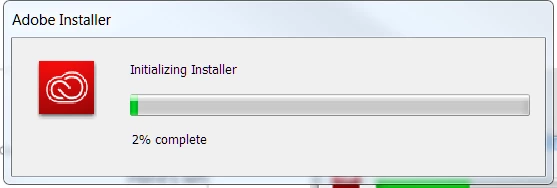
I ran through your KB articles about connecting to the Adobe servers, registrations, etc and still no success. This is a terrible way to install and support software.

This topic has been closed for replies.
Correct answer Arshad091

Try deleting the mentioned folders manually from the location

Windows location:

C:\Program Files (x86)\Common Files\Adobe\

Folders: AAMUpdaterInventory, AdobeApplicationManager, Adobe PCD, OOBE, SLCache,

Location:

C:\ProgramData\Adobe

Folders: AAMUpdater, OOBE, SLStore

Location:

C:\Users\(username)\AppData\Local\Adobe

Folders: AAMUpdater, OOBE

Location:

C:\Users\(username)\AppData\Roaming\Adobe

Folders:

Adobe PCD,OOBE

After deleting the folders, try installation again.

Hope it helps.

2 replies

Arshad091Correct answer
Participant
March 2, 2018

Try deleting the mentioned folders manually from the location

Windows location:

C:\Program Files (x86)\Common Files\Adobe\

Folders: AAMUpdaterInventory, AdobeApplicationManager, Adobe PCD, OOBE, SLCache,

Location:

C:\ProgramData\Adobe

Folders: AAMUpdater, OOBE, SLStore

Location:

C:\Users\(username)\AppData\Local\Adobe

Folders: AAMUpdater, OOBE

Location:

C:\Users\(username)\AppData\Roaming\Adobe

Folders:

Adobe PCD,OOBE

After deleting the folders, try installation again.

Hope it helps.

kglad
Community Expert
Community Expert
March 2, 2018

could you confirm you could connect by seeing both logos?