


Cactus Pan
Participant
November 28, 2021
Answered

creative cloud icons not working [MS Visual C++ error]

  • November 28, 2021
  • 1 reply
  • 367 views

if i click on photoshop of indesign they open fine. however, if I click on prem pro, after effects or pre rush I get nothing. the "open" button highlights but if wont launch the program??  anyone understand whats going on? i have tried installing the apps, installing previous versions but just get the same error. please help 😄

This topic has been closed for replies.
Correct answer Jeffrey_A_Wright

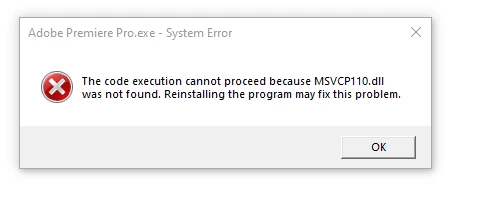
i just  tried running it from explorer rather than the cc dialog and got this error. i have tried reinstalling the programs btw. 


Cactus Pan, I am very sorry, but reinstalling the Adobe applications will not help. The most recent error indicates the Microsoft Visual C++ Redistributables have been damaged.  Please see https://helpx.adobe.com/x-productkb/global/unable-to-launch-adobe-applications-on-windows---error-vcruntime.html for information on how to repair this damage to the Windows operating system.

1 reply

Nancy OShea
Community Expert
Community Expert
November 28, 2021

Which operating system do you have?

If you're on Windows, try right-click > More > Run as Administrator.


Nancy O'Shea— Product User & Community Expert
Cactus Pan
Participant
November 29, 2021

thanks nancy.  ive tried right clicking everywhere on here but don't get the option to run as admin. and yes, running windows

Cactus Pan
Participant
November 29, 2021

i just  tried running it from explorer rather than the cc dialog and got this error. i have tried reinstalling the programs btw.