Participant
October 17, 2021
解決済み

Creative Cloud Installation

  • October 17, 2021
  • 返信数 2.
  • 1013 ビュー

How can I install Creative Cloud All Apps on E: drive instead of C: drive?

    このトピックへの返信は締め切られました。
    解決に役立った回答 Nancy OShea

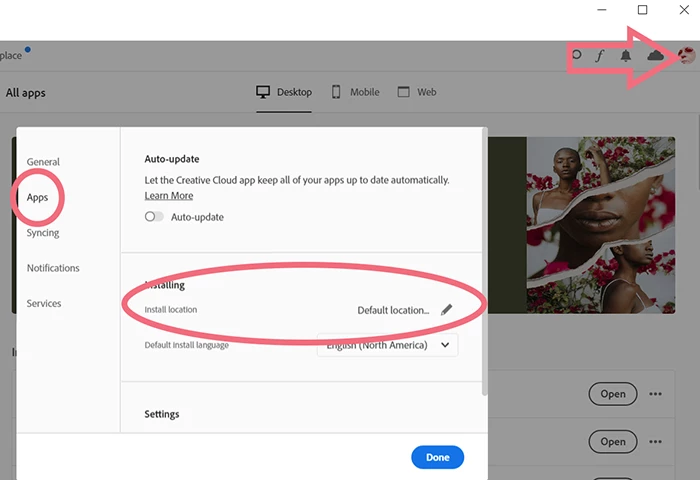
    From your Creative Cloud Desktop App, change the install location. See screenshot.


    返信数 2

    Nancy OShea
    Community Expert
    Nancy OSheaCommunity Expert解決!
    Community Expert
    October 17, 2021

    From your Creative Cloud Desktop App, change the install location. See screenshot.


    Nancy O'Shea— Product User & Community Expert
    Participant
    October 19, 2021

    Wow, thank you Nancy O'Shea!  I got it fixed now.

    Tech support that I talked to didn't know how to do this.

    Patricia Manroe


    Nancy OShea
    Community Expert
    Community Expert
    October 19, 2021
    quote

    Wow, thank you Nancy O'Shea!  I got it fixed now.

    Tech support that I talked to didn't know how to do this.

    ==========

    @Patricia J5C45,

    You're very welcome. 

    That's a bit surprising.  Did you contact Adobe support directly?  Or was it some 3rd party on Facebook, etc...?


    For future reference, you can CONTACT ADOBE SUPPORT two ways:
    ================
    Online Chat: https://helpx.adobe.com/contact.html?rghtup=autoOpen
    Phone M-F, during normal business hours: https://helpx.adobe.com/contact/phone.html


    Nancy O'Shea— Product User & Community Expert
    John T Smith
    Community Expert
    Community Expert
    October 17, 2021