petec45754425
Participant
May 31, 2015
Answered

Creative Cloud Installation Problems

  • May 31, 2015
  • 2 replies
  • 829 views

Hi,

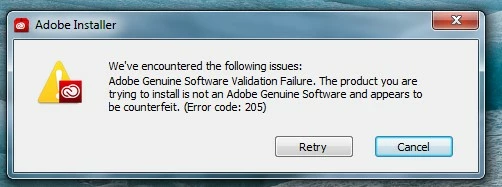
I am experiencing a problem installing Creative Cloud.It start to run and then I get the following message:

I have tried downloading several times and running as an administrator, but I always get the same problem.

I'm using a PC with Windows 7 Home Premium.

This topic has been closed for replies.
Correct answer Govardhan.V

I have tried this. I still have the same problems using Creative Cloud and get the following message when I try the direct links:

Access Denied

You don't have permission to access "http://trials3.adobe.com/AdobeProducts/LTRM/6/win64/Lightroom_6_LS11.exe?" on this server.

Reference #18.7da2c017.1433437957.3446c0c7

I have tried on different browsers. Will now try on my laptop.

Pete


Click on the below link and open Photoshop Elements download link.

Do not close the page , simply keep it open.

Download Photoshop Elements products | 13, 12, 11, 10

Then click on below link :

http://trials3.adobe.com/AdobeProducts/LTRM/6/win64/Lightroom_6_LS11.exe

2 replies

Pattie-F
Legend
June 3, 2015

You can also take a look at this link:

Genuine Verification failure downloading or installing

Pattie

petec45754425
Participant
June 3, 2015

Hi,

Thanks to all of the help provided I have solved the initial problems and Creative Clod is now installed and appears to function. However, when I try to install Lightroom or Photoshop it stops on 0% and I get this message.

I have tried numerous times, with and without the Firewall on, and have followed some of the suggestions for this error, but so far I have got nowhere.

Pete

Govardhan.V
Participating Frequently
June 4, 2015

Please click on Learn More option and post exact complete error message or simply upload snapshot of it

Govardhan.V
Participating Frequently
May 31, 2015

Make sure Adobe Creative Cloud is not listed under Control Panel > Program and Features. list.

If present remove it.

Step 1 :

Open C:drive and navigate to C:\Program Files (x86)\ " Common Files" \Adobe.

Open Adobe folder and delete folders named Adobe Application Manager and OOBE.

Step 2:

Navigate to C:\Program Files (x86)\Adobe.

Open Adobe folder and if present delete Adobe Creative Cloud folder. [**important]

Step 3 :

Press Windows button (located between Ctrl and Alt buttons) along with R button together at a time , you will get a run command window.

Type in below command and hit 'Enter' key.

appdata

Then navigate to Local>Adobe.

Open Adobe folder and delete folders named AAMUpdater and OOBE.


Step 4 )


Click on the below link and download Adobe Application manager and install the same :

http://download.adobe.com/pub/adobe/creativesuite/cc/win/ApplicationManager9.0_all.exe

Once the installation process is completed, locate Adobe Application Manager launch icon on Desktop and double click on it .

It will start update process.

once it is completed, it should get updated to Adobe Creative Cloud application.

If you get any error code like A12E5 refer below link :

Everytime i try to download the creative cloud, i keep getting an error messege with error205.