Rღse
Participating Frequently
September 27, 2015
Answered

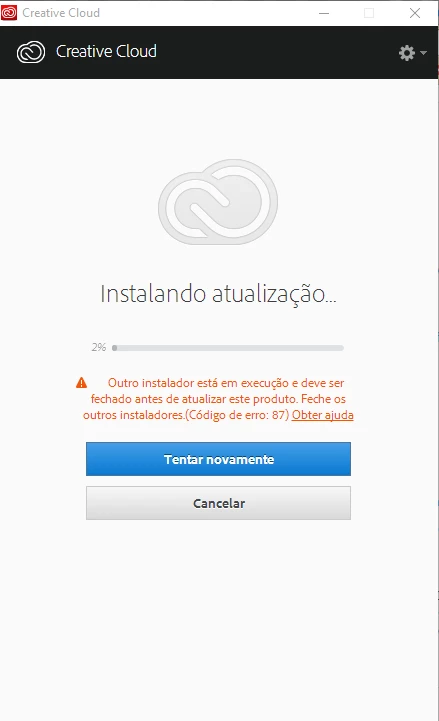
creative cloud is trying to update for days and is stuck with in error, can't use, update, uninstall or reinstall...

  • September 27, 2015
  • 2 replies
  • 667 views

Creative cloud say there's other installer running and to close it first... there's no installer running!

i can't login, can't uninstall, can't repair or reinstall, can't update, can't use app, can't do nothing... looked other questions and tutorials but can't find a solution to help me with this issue.

i use windows 10. please what can i do?
This topic has been closed for replies.
Correct answer Sheena Kaul

sorry... code error 87, not 2...


Please see creative cloud installation Error 87

2 replies

Sheena Kaul
Legend
September 27, 2015
RahulTyagi_
Participating Frequently
September 27, 2015

Hi Ana,

Please let me know if you have tried any troubleshooting steps to resolve this issue so that we can proceed accordingly.


Regards,
Rahul

Rღse
RღseAuthor
Participating Frequently
September 27, 2015

i tried to do all i could... i don't know what installer is running for days, i've my pc updated for win10 for a week now and have all drivers updating too. i didn't use adobe since that but thursday and friday i notice that i couldn't open photoshop because creative cloud was stuck in 2% updating and saying error. tried to uninstall and for that i know that i need to uninstall the app first, but i can't do it because they all give me same message after 99% uninstalled, an installer is running that needs to be close first but i don't have any installer working that i can see... 

next i'll paste a link for the screenshot of specific message i receive Gyazo - b43c406a36602d04a80b2b85c3b52db0.png

creative cloud stay rolling rolling and then give me that message i posted in preview ticket... am not expert in pc but i manage simple tutorials and can't find a correct action to fix it.