Participant
August 29, 2016
Answered

Creative Cloud keeps restarting so can't download trial CC app

  • August 29, 2016
  • 3 replies
  • 1618 views

Windows 10, i7 processor, 256GB SSD, download speed currently between 30 and 40 Mbits/second.

When I try to download InDesign trial it gets to 25 or 30% complete and Creative Cloud downloader restarts, killing the download. I get this message:
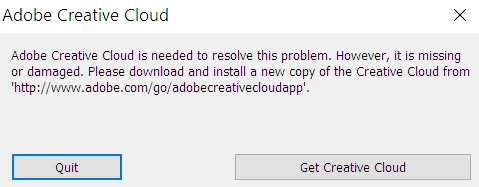
I can't uninstall and reinstall because it refuses to uninstall, saying I have apps that require it. Perhaps this is because I am on a 30-day trial of Adobe Framemaker 2015. I assume even if I purchased CC, I wouldn't be able to install it. When I try to reinstall it, it just starts up the already installed Creative Cloud app.

What do do?

Thanks. -- Steve Zaslaw

This topic has been closed for replies.
Correct answer Sheena Kaul

Moving to Creative Cloud Download & Install

Hi Stephen,

Please follow the steps below:

Uninstall Adobe Creative Cloud application from Control Panel.

Step 1 :

Open C:drive and navigate to C:\Program Files (x86)\ " Common Files" \Adobe.

Open Adobe folder and delete folders named Adobe Application Manager and OOBE.

Step 2:

Navigate to C:\Program Files (x86)\Adobe.

Open Adobe folder and if present delete Adobe Creative Cloud folder. [**important]

Step 3 :

Press Windows button (located between Ctrl and Alt buttons) along with R button together at a time , you will get a run command window.

Type in below command and hit 'Enter' key.

appdata

Then navigate to Local>Adobe.

Open Adobe folder and delete folders named AAMUpdater and OOBE.

Step 4 :

Click on the blow link and download Adobe Application manager and install the same :

http://download.adobe.com/pub/adobe/creativesuite/cc/win/ApplicationManager9.0_all.exe

Once the installation is completed, double click on Adobe Application Manager launch icon on Desktop.

It will start update process and gets updated to Creative Cloud application .

Hope that helps!

Regards,

Sheena

3 replies

Participating Frequently
February 20, 2018

I'm having the same issue. I have two systems that are identical to each other and on the same internet connection. Each has their own adobe logins. One is fine and the other reboot every few minutes and eventually CC crashes. Ran threw all of the fixes that have been posted and nothing helps. These are both windows 10 systems with i5s, Nvidia cards and 16g of ram. The only difference is the computer with the issue has Quick books on it.  I have an IT background although I don't do it anymore for a living. So I scrubbed the system of adobe anything including the registry, files, IDs and DLLs. Started over with a fresh install which worked ......Until I rebooted......... And it still has the same issue. I'm guessing it's a hardware conflict that Adobe hasn't ever bothered to address.

Sheena Kaul
Sheena KaulCorrect answer
Legend
August 30, 2016

Moving to Creative Cloud Download & Install

Hi Stephen,

Please follow the steps below:

Uninstall Adobe Creative Cloud application from Control Panel.

Step 1 :

Open C:drive and navigate to C:\Program Files (x86)\ " Common Files" \Adobe.

Open Adobe folder and delete folders named Adobe Application Manager and OOBE.

Step 2:

Navigate to C:\Program Files (x86)\Adobe.

Open Adobe folder and if present delete Adobe Creative Cloud folder. [**important]

Step 3 :

Press Windows button (located between Ctrl and Alt buttons) along with R button together at a time , you will get a run command window.

Type in below command and hit 'Enter' key.

appdata

Then navigate to Local>Adobe.

Open Adobe folder and delete folders named AAMUpdater and OOBE.

Step 4 :

Click on the blow link and download Adobe Application manager and install the same :

http://download.adobe.com/pub/adobe/creativesuite/cc/win/ApplicationManager9.0_all.exe

Once the installation is completed, double click on Adobe Application Manager launch icon on Desktop.

It will start update process and gets updated to Creative Cloud application .

Hope that helps!

Regards,

Sheena

kazey
Participant
December 28, 2017

^^^ THESE STEPS DO *NOT* FIX THE 'CREATIVE CLOUD RESTARTING' PROBLEM!!! Why do y'all keep copying & pasting the SAME instructions when they don't even work? And why is the forum question then marked  as "Answered" even though the OP and others are still asking how to fix the same issue?!? And why are we PAYING Adobe for this frustration?!!?

kglad
Community Expert
Community Expert
August 29, 2016

uninstall everything cc including the desktop app, https://helpx.adobe.com/creative-cloud/help/uninstall-creative-cloud-desktop-app.html

clean per http://www.adobe.com/support/contact/cscleanertool.html

restart your computer

reinstall the cc desktop app, https://creative.adobe.com/products/creative-cloud

use the desktop app to install your apps and trials.

KvV2eAuthor
Participant
August 29, 2016

Adobe support remotel desktop for a few hours and they couldn't fix it. Funny. This is a new Windows 10 machine with plenty horsepower, so maybe I won't be able to do CC. An I alone out here or what?

Inspiring
September 2, 2016

KvV2e schrieb:

Adobe support remotel desktop for a few hours and they couldn't fix it. Funny. This is a new Windows 10 machine with plenty horsepower, so maybe I won't be able to do CC. An I alone out here or what?

lol.. you really wasted your time with some people who read 0815 solution from a book?