



Participant
March 6, 2025
Question

creative cloud needs update windows v22h2 while it's up to date

  • March 6, 2025
  • 3 replies
  • 440 views

Hi there 

My creative cloud needs update windows v22h2 while it's up to date

every time this messege pop-up
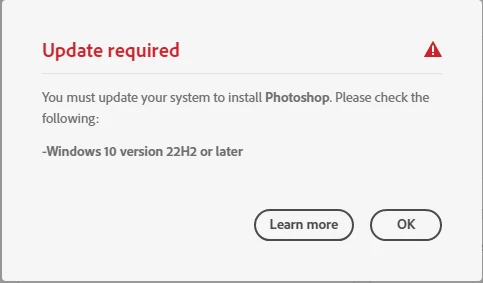
my system is: 

Edition Windows 10 Pro
Version 22H2
Installed on ‎2/‎11/‎2023
OS build 19045.5555
Experience Windows Feature Experience Pack 1000.19061.1000.0

i only installed Illustrator and Acrobat

please help!

3 replies

Nancy OShea
Community Expert
Community Expert
March 6, 2025

Make sure your computer meets the minimum requirements. Most Creative Cloud apps work on these systems, no more than 2 versions back:

  • Windows 11 (64-bit) versions 24H2, 23H2; Windows 10 versions 22H2, 21H2;
  • MacOS 15 (Sequoia), 14.7 (Sonoma), 13.6.7 (Ventura).

- https://helpx.adobe.com/creative-cloud/system-requirements.html

Nancy O'Shea— Product User & Community Expert
Participant
March 8, 2025

my system and PC specs. are above requirments 


Device name DESKTOP-MINA
Processor Intel(R) Core(TM) i7-7700 CPU @ 3.60GHz 3.60 GHz
Installed RAM 16.0 GB (15.9 GB usable)
Device ID 19AD4FD1-6642-47B6-A774-D1C95CBDF641
Product ID 00330-70000-00002-AAOEM
System type 64-bit operating system, x64-based processor
Pen and touch No pen or touch input is available for this display


Edition Windows 10 Pro
Version 22H2
Installed on ‎2/‎11/‎2023
OS build 19045.5555
Experience Windows Feature Experience Pack 1000.19061.1000.0

kglad
Community Expert
Community Expert
March 8, 2025

@Mina_Wahba 


what's your default browser (and version)?

kglad
Community Expert
Community Expert
March 6, 2025

in the future, to find the best place to post your message, use the list here, https://community.adobe.com/

p.s. i don't think the adobe website, and forums in particular, are easy to navigate, so don't spend a lot of time searching that forum list. do your best and we'll move the post (like this one has already been moved) if it helps you get responses.


<"moved from cc desktop bugs">
Participant
March 6, 2025

Thanks a lot!


kglad
Community Expert
Community Expert
March 6, 2025

@Mina_Wahba 


you're welcome.  is the problem resolved?

kglad
Community Expert
Community Expert
March 6, 2025

make sure your default browser is not opera and is up-to-date.  for more info read, https://helpx.adobe.com/photoshop-elements/kb/update-required.html