


Participating Frequently
March 23, 2024
Answered

Creative Cloud not showing apps for installing

  • March 23, 2024
  • 2 replies
  • 5803 views

Hello everyone,

My desktop version of Creative Cloud is showing just some apps for installing, not all. I've tried pretty much everything I've found in these forums and other places and no luck.
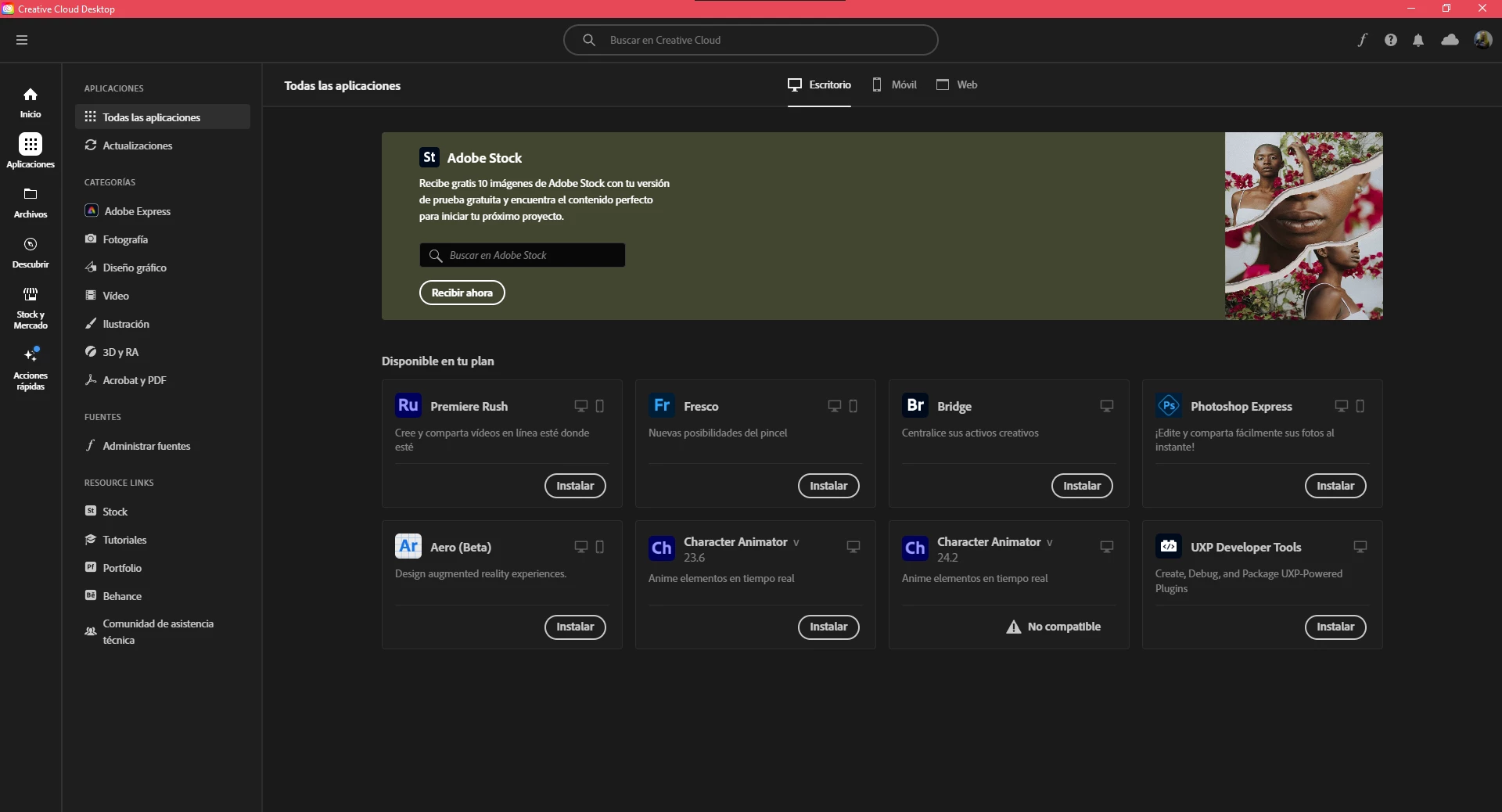
The web version of Creative Cloud shows all of the applications.

I really need to utilize Premiere ASAP for work. Any one has any kind of idea for a solution?

Thank you very much.

Correct answer kglad

Yes, and it used to work.

Actually, as a little more info:

I had Premiere and Photoshop 2023 versions. I uninstalled them to download the 2024 versions and the apps just dissapeared from the CC, as shown in the image I posted.


you should probably skip to the clean install steps.


reset the cc desktop app by making sure it's in the foreground, then press:

Win: Ctrl + Alt + R
Mac: Cmd + Opt + R


if that fails, repair per https://helpx.adobe.com/download-install/kb/creative-cloud-install-stuck.html


if that fails and you have windows, open your control panel > add/remove programs > cc desktop app > repair

if that fails, uninstall using the correct uninstaller from https://helpx.adobe.com/creative-cloud/help/uninstall-creative-cloud-desktop-app.html#sa_src=web-messaging and then reinstall using*


if that fails, do a clean cc install carefully following each applicable step:

uninstall every cc app including preferences per https://helpx.adobe.com/creative-cloud/help/uninstall-remove-app.html

then uninstall the cc desktop app, again using the correct uninstaller per https://helpx.adobe.com/creative-cloud/help/uninstall-creative-cloud-desktop-app.html#sa_src=web-messaging

clean your computer of cc files per http://www.adobe.com/support/contact/cscleanertool.html

check for, and if available, update your os

if windows is your os, repair all ms visual c++ versions that can be repaired (use google if you don't know how to do this)

if windows is your os update your ms visual c++, if it can be updated (use google if you don't know how to do this)

restart your computer (don't skip this)

reinstall the cc desktop app using the "alternative download links" at the bottom of the page at https://helpx.adobe.com/download-install/kb/creative-cloud-desktop-app-download.html

use the desktop app to install your cc programs/trials

2 replies

Nancy OShea
Community Expert
Community Expert
March 24, 2024

It's looks like you're logged-in as an Adobe Express user.


1. Open CC Desktop App.
2. Click your Avatar (top right image) > Preferences > General tab > Settings. Select "Always keep Creative Cloud up to date."
3. Click on your Avatar again.
4. Sign-out of Creative Cloud.
5. Close all apps.
6. Restart your computer.
7. Open CC Desktop app.
8. Click your Avatar.
9. Sign-in with your paid Creative Cloud ID and password.


Hope that helps.


Nancy O'Shea— Product User & Community Expert
Participating Frequently
March 25, 2024

It didn't work 😞

Still showing just those apps. Also, if I login with another account (a friends, that works on other PC's) it still just shows those apps.

kglad
Community Expert
Community Expert
March 25, 2024

does your computer meet the specs of, eg photoshop?


specs - https://helpx.adobe.com/creative-cloud/system-requirements.html

kglad
Community Expert
Community Expert
March 23, 2024

do you have a teams, enterprise or education subscription?

Participating Frequently
March 23, 2024

No. A personal monthly subscription.

kglad
Community Expert
Community Expert
March 23, 2024

check your account, https://account.adobe.com


IF that shows your active subscription, sign out and then back in to your cc desktop application using the same adobe id used to verify your subscription: http://helpx.adobe.com/creative-cloud/kb/sign-in-out-creative-cloud-desktop-app.html