
Participant
February 26, 2019
Answered

Creative Cloud on Windows 10 is no longer opening or repairing..

  • February 26, 2019
  • 3 replies
  • 10357 views

Hello - Sorry, I'm at a complete loss of what to do. I have the creative suite for work, and as off about a week ago my creative cloud app will not open. Every time I try to open it, it sits in the background for about 10 mins before displaying a prompt that there is a problem and I should "repair it".. the repair doesn't work.
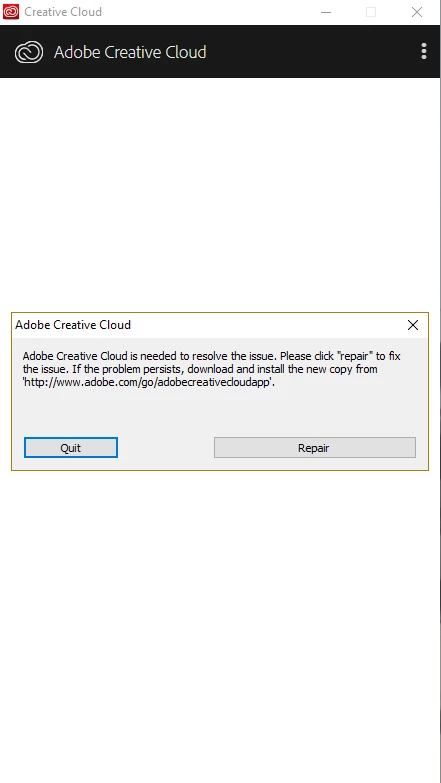
I have tried uninstalling the Creative Cloud app using the standard Windows uninstaller, but I get a second prompt telling me that it will not uninstall as there are other Adobe apps currently installed that require the Creative Cloud... this is a very circular argument.

I finally managed to uninstall the Creative Cloud app via the "AdobeCreativeCloudCleanerTool.exe", and then re-installed it from scratch.  This did not work - I'm back at square one, with the same 10 min wait with the above posted pop up message.

Has anyone else been having problems with Creative Cloud on windows recently and been able to fix it?

Cheers,

D.

This topic has been closed for replies.
Correct answer Paul-M

Cheers for the response Energize - I thought that I might be able to avoid doing that, but I guess not.

Essentially "Take off and Nuke the site from orbit" approach

I know that could be a pain if you have lot of Adobe apps installed you'd need to uninstall all of them first before unistalling Creative Cloud Desktop via Windows.

You could first try removing Adobe Creative Cloud Desktop with the cleanup tool alone (you won't need to remove any other Adobe apps  with this method). Then, make sure you have downloaded the latest version of Creative Cloud Desktop and try reinstalling...

When you launch the cleanup tool you'll get a number of options, this is the sequence you should choose:

1) Choose your language

2) Agree to disclaimer

3) Select ' 1) All'

4) Select '1) Creative Creative Cloud Desktop

Wouldn't do any harm to do a reboot after this before you try reinstalling the latest version of Creative Cloud Desktop.

3 replies

Participant
December 25, 2019

mine won't even uninstall just goes round and round and I just want a one-click solution, not a computer programmer master class.

Photoshop still works so I'm not that bothered.

tedb63088269
Participant
October 26, 2019

Same boat.  Nothing fixes this.

Participant
December 25, 2019

feels like rubbish fix suggestions. Trying to delete apps just opens creative cloud again and won't run the uninstall programme.


grrrr..

Legend
February 26, 2019

Uninstall, then use the cleanup tool​ to to check nothing has been left behind.

Reinstall the latest version .... I had the same exact issue...

Paul-M - Community Expert
Participant
February 27, 2019

Cheers for the response Energize - I thought that I might be able to avoid doing that, but I guess not.

Essentially "Take off and Nuke the site from orbit" approach

Paul-MCorrect answer
Legend
February 27, 2019

Cheers for the response Energize - I thought that I might be able to avoid doing that, but I guess not.

Essentially "Take off and Nuke the site from orbit" approach

I know that could be a pain if you have lot of Adobe apps installed you'd need to uninstall all of them first before unistalling Creative Cloud Desktop via Windows.

You could first try removing Adobe Creative Cloud Desktop with the cleanup tool alone (you won't need to remove any other Adobe apps  with this method). Then, make sure you have downloaded the latest version of Creative Cloud Desktop and try reinstalling...

When you launch the cleanup tool you'll get a number of options, this is the sequence you should choose:

1) Choose your language

2) Agree to disclaimer

3) Select ' 1) All'

4) Select '1) Creative Creative Cloud Desktop

Wouldn't do any harm to do a reboot after this before you try reinstalling the latest version of Creative Cloud Desktop.

Paul-M - Community Expert