Participant
September 28, 2022
Answered

Creative Cloud Programs Will Open to a Blank Grey Screen

  • September 28, 2022
  • 1 reply
  • 813 views

I'm running InDesign, Photoshop, Illustrator as of yesterday I can't get them to work at all.


They will open but it's just a blank grey screen and all the menu options are greyed out.


I've uninstalled and reinstalled, tried to restart and hold down the keys to delete the preferences etc...


Any help??


Thanks!

This topic has been closed for replies.
Correct answer kglad

reset the cc desktop app: make sure it's in the foreground, then press:

Win: Ctrl + Alt + R
Mac: Cmd + Opt + R

if that fails, try to repair
https://helpx.adobe.com/download-install/kb/creative-cloud-install-stuck.html

if that fails go ahead and uninstall using the correct uninstaller from https://helpx.adobe.com/creative-cloud/help/uninstall-creative-cloud-desktop-app.html#sa_src=web-messaging and then reinstall

if that fails, do a clean cc install following each applicable step:

uninstall every cc app including preferences, https://helpx.adobe.com/creative-cloud/help/uninstall-remove-app.html

then uninstall the cc desktop app, again using the correct uninstaller, https://helpx.adobe.com/creative-cloud/help/uninstall-creative-cloud-desktop-app.html#sa_src=web-messaging

clean your computer of cc files per http://www.adobe.com/support/contact/cscleanertool.html


check for, and if available, update your os

restart your computer (don't skip this)

reinstall the cc desktop app, https://creativecloud.adobe.com/apps/all/desktop?action=install&source=apps&productId=creative-cloud

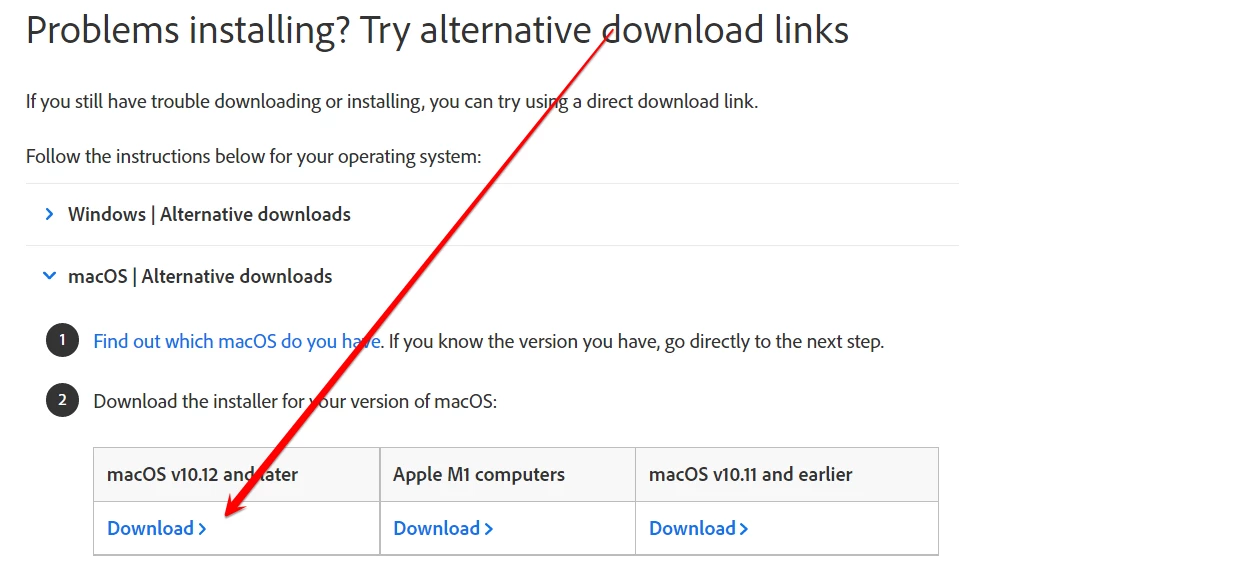
if you're unable to download the cc desktop app at this stage, use the "alternative download links" at the bottom of the page at https://helpx.adobe.com/download-install/kb/creative-cloud-desktop-app-download.html and select the correct installer for your os.  probably this one:


use the desktop app to install your cc programs/trials

1 reply

kglad
Community Expert
Community Expert
September 28, 2022

has this problem always been present or were those programs working properly when first installed.


if they were once working properly, what changed?

Participant
September 28, 2022

My computer shut down yesterday randomly, then when I turned it back on all the programs reopened and seemed to be fine.


That was until I went to make a new document and it was greyed out, then after that all the menu options started greying out and I couldn't even close it. I force quit it and uninstalled and reinstalled. I've tried to delete the preferences as well.


I'm running Catalina 10.15.7

kglad
Community Expert
kgladCommunity ExpertCorrect answer
Community Expert
September 28, 2022

reset the cc desktop app: make sure it's in the foreground, then press:

Win: Ctrl + Alt + R
Mac: Cmd + Opt + R

if that fails, try to repair
https://helpx.adobe.com/download-install/kb/creative-cloud-install-stuck.html

if that fails go ahead and uninstall using the correct uninstaller from https://helpx.adobe.com/creative-cloud/help/uninstall-creative-cloud-desktop-app.html#sa_src=web-messaging and then reinstall

if that fails, do a clean cc install following each applicable step:

uninstall every cc app including preferences, https://helpx.adobe.com/creative-cloud/help/uninstall-remove-app.html

then uninstall the cc desktop app, again using the correct uninstaller, https://helpx.adobe.com/creative-cloud/help/uninstall-creative-cloud-desktop-app.html#sa_src=web-messaging

clean your computer of cc files per http://www.adobe.com/support/contact/cscleanertool.html


check for, and if available, update your os

restart your computer (don't skip this)

reinstall the cc desktop app, https://creativecloud.adobe.com/apps/all/desktop?action=install&source=apps&productId=creative-cloud

if you're unable to download the cc desktop app at this stage, use the "alternative download links" at the bottom of the page at https://helpx.adobe.com/download-install/kb/creative-cloud-desktop-app-download.html and select the correct installer for your os.  probably this one:


use the desktop app to install your cc programs/trials