



slipd
Inspiring
July 5, 2024
Answered

Creative Cloud removal - issue

  • July 5, 2024
  • 2 replies
  • 475 views

Hi guys,


Completely removed CC the other day after a successful trial and now I get this, usually not long after start up:
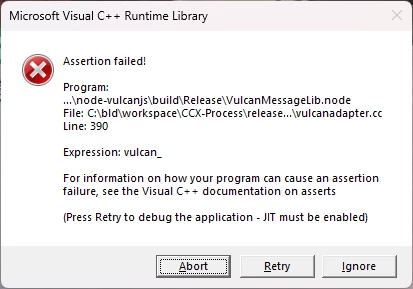


Tried running the Adobe Cloud removal tool but the issue persists.


I notice I still have 2x Adobe start up entires set to run in the background - related maybe?


Thoughts?

This topic has been closed for replies.
Correct answer slipd

Hi there,


I appear to have been successful in stopping the error. Traditional removal methods, using the uninstaller etc.,only seemed to remove half the product. 


Have followed community advice, run Ccleaner for reg fixes and deleted anything on my C: drive with 'adobe' in it 🙂


Think I'm good now.

2 replies

Shivangi_Gupta
Community Manager
Community Manager
July 8, 2024

Hi there,

We appreciate you contacting the forum. Did you try the suggested steps by the expert? Did it help?

Let us know.


Regards,

Shivangi

slipd
slipdAuthorCorrect answer
Inspiring
July 10, 2024

Hi there,


I appear to have been successful in stopping the error. Traditional removal methods, using the uninstaller etc.,only seemed to remove half the product. 


Have followed community advice, run Ccleaner for reg fixes and deleted anything on my C: drive with 'adobe' in it 🙂


Think I'm good now.

kglad
Community Expert
Community Expert
July 10, 2024

@slipd 


good to hear that helped.

kglad
Community Expert
Community Expert
July 5, 2024


to properly uninstall:

uninstall every cc app including preferences per https://helpx.adobe.com/creative-cloud/help/uninstall-remove-app.html

then uninstall the cc desktop app, again using the correct uninstaller per https://helpx.adobe.com/creative-cloud/help/uninstall-creative-cloud-desktop-app.html#sa_src=web-messaging

clean your computer of cc files per http://www.adobe.com/support/contact/cscleanertool.html