
christophere44132637
Participant
June 7, 2020
Answered

Creative cloud spamming me after uninstalling Illustrator.

  • June 7, 2020
  • 1 reply
  • 766 views

I uninstalled Illustrator from my computer today and since then, every five minutes, I've been getting spammed with the same message:
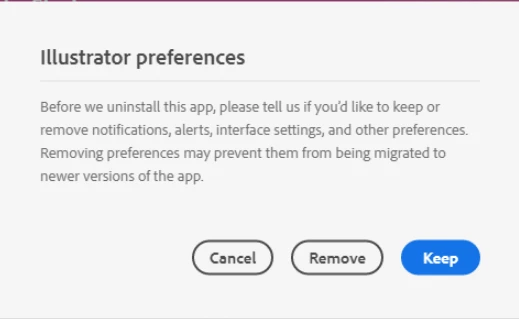


I've tried all options given to me by the notification, but it will just come back five minutes later anyway.

Restarting my computer does not work.

Exiting creative cloud and closing all processes doesn't work. It will just boot up creative cloud again and taunt me with the same message. 

I don't want to uninstall creative cloud, is there some way that I can stop this annoying pop-up?
This topic has been closed for replies.
Correct answer Nancy OShea

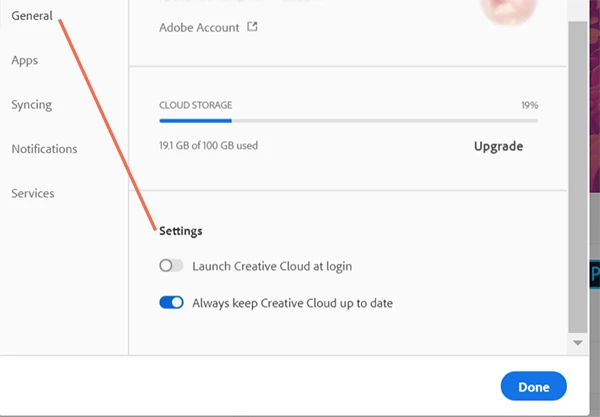
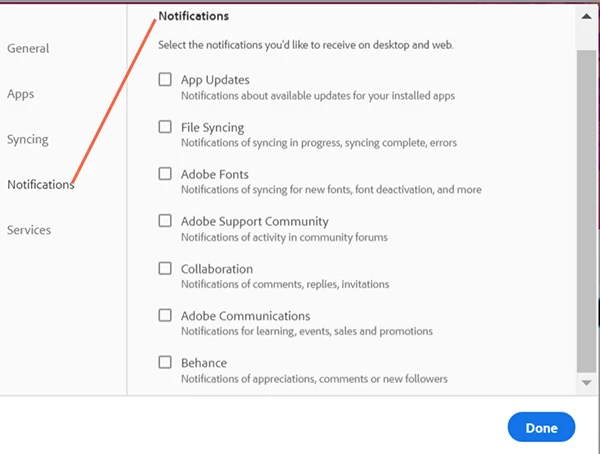
I have disabled Creative Cloud Desktop App from launching on startup in my operating system's settings as well as CC Desktop App.   Also turn off Notifications.  


Go to Preferences (gear icon).  See screenshots.


1 reply

Nancy OShea
Community Expert
Nancy OSheaCommunity ExpertCorrect answer
Community Expert
June 7, 2020

I have disabled Creative Cloud Desktop App from launching on startup in my operating system's settings as well as CC Desktop App.   Also turn off Notifications.  


Go to Preferences (gear icon).  See screenshots.


Nancy O'Shea— Product User & Community Expert
christophere44132637
Participant
June 7, 2020

Greatly appreciated, Nancy. The issue appears to be resolved following your advice 🙂 

Nancy OShea
Community Expert
Community Expert
June 7, 2020

Great!  Glad to be of help.


Nancy O'Shea— Product User & Community Expert