
Known Participant
October 2, 2020
Question

Creative Cloud Start-Up error

  • October 2, 2020
  • 3 replies
  • 499 views

After the last update I have trouble starting Creative Cloud, I always receive following message (Dutch): 
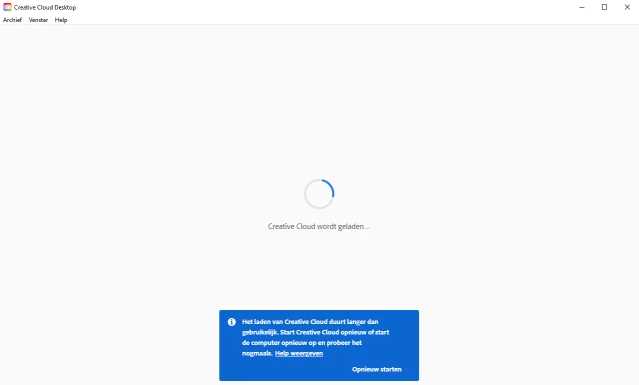


Clicking on the restart link in the blue area or using keyboard shurtcut Ctrl+Alt+R restarts and opens the app.
But on next power up it still gives the same error.

Do you have a solution for this?

Win10 (latest Update) - 64bit

Creative Cloud 5.3.0.468
Kind regards, Alex

This topic has been closed for replies.

3 replies

Just Shoot Me
Legend
October 3, 2020

You don';t really need that application Starting with your system to use any of the real Adobe software programs. So Stop it from starting with your system and stop it froom checking for updates Automatically.

You do that in the CC desktop app preferences.


Then shut down for the current session.


Known Participant
October 4, 2020

Of course that's one of the possible solutions.
But I find that overview panel very usefull and used it for years.
It worked until now, so it's up to Adobe to deliver solutions when something went wrong with their panels/apps.

OK, this support Community proposed possible solutions but isn't it time to transfer this problem to de Adobe Technical Team (or how they are called)?

Jeffrey_A_Wright
Community Manager
Community Manager
October 5, 2020

I am sorry you continue to encounter problems, Alex. For your next steps, please download and run the CC Log Collector tool from http://helpx.adobe.com/creative-cloud/kb/cc-log-collector.html.   Once the logs are uploaded, you can then begin a secure chat session at https://helpx.adobe.com/contact.html so direct assistance can be provided.

Known Participant
October 2, 2020


This is the windows version.


And this is the error message:

Translated:  it takes to long to load the Creative Cloud app.
I always click on "Opnieuw Starten" which means "Start Again". This works but after a power down and restart the same error message appears again.
I uninstall Creative Cloud with the uninstaller find in Adobe Help, downloaded the last version and installed it again ... but it didn't help.

Jeffrey_A_Wright
Community Manager
Community Manager
October 2, 2020

AlexBoelBelgium, thank you for posting the text of the error. I would recommend implementing the solutions listed in https://helpx.adobe.com/creative-cloud/kb/creative-cloud-missing-damaged.html to remove and reinstall the Creative Cloud desktop app.


Please update this public forum discussion if you have any questions about the solutions listed.

Known Participant
October 3, 2020

Hi Jeff,

I tried out the 4 solutions mentioned in the provided link: none of them solved the problem, still got tat error message.

AxelMatt
Community Expert
Community Expert
October 2, 2020

Please give us the complete error message. from the screenshot it isn't readable.

Please post also the exact version of your Windows version.

My System: Intel i7-8700K - 64GB RAM - NVidia Geforce RTX 3060 - Windows 11 Pro 25H2 -- LR-Classic 15 - Photoshop 27 - Nik Collection 8 - PureRAW 5 - Topaz Photo