



LeyendaV
Inspiring
October 27, 2025
Answered

Creative Cloud suddenly not recognizing apps. Can't update.

  • October 27, 2025
  • 2 replies
  • 230 views

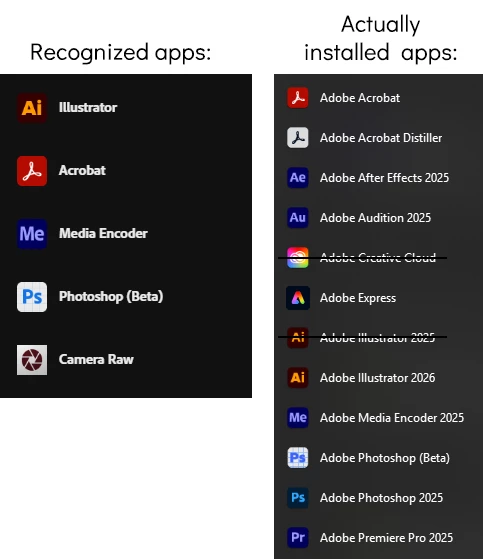
My Creative Cloud app suddenly decided to not recognize most of my installed apps, meaning I can't update them cause there's no other way than from the CC app.


As you can see down here, the lists don't match (I installed Ai 2025 before taking the screenshot, and I know the CC app won't appear in its own panel):
 

Considering I'm paying for this, not being able to use the latest version simply because the app manager doesn't feel like letting me, it's very insulting.


I'll like to add, I literally didn't make any kind of change or modification. One day I just noticed some apps not updating and, when I looked into the manager, this is what I found.

Correct answer LeyendaV

reset the cc desktop app by making sure it's in the foreground, then press:

Win: Ctrl + Alt + R
Mac: Cmd + Opt + R


if that fails, repair per https://helpx.adobe.com/download-install/kb/creative-cloud-install-stuck.html


if that fails and you have windows, open your control panel > add/remove programs > cc desktop app > repair

if that fails, uninstall using the correct uninstaller from https://helpx.adobe.com/creative-cloud/help/uninstall-creative-cloud-desktop-app.html#sa_src=web-messaging and then reinstall using*


if that fails, do a clean cc install carefully following each applicable step:

uninstall every cc app including preferences per https://helpx.adobe.com/creative-cloud/help/uninstall-remove-app.html

then uninstall the cc desktop app, again using the correct uninstaller per https://helpx.adobe.com/creative-cloud/help/uninstall-creative-cloud-desktop-app.html#sa_src=web-messaging

clean your computer of cc files per http://www.adobe.com/support/contact/cscleanertool.html

check for, and if available, update your os

if windows is your os, repair all ms visual c++ versions that can be repaired (use google if you don't know how to do this)

if windows is your os update your ms visual c++, if it can be updated (use google if you don't know how to do this)

restart your computer (don't skip this)

reinstall the cc desktop app using the "alternative download links" at the bottom of the page at https://helpx.adobe.com/download-install/kb/creative-cloud-desktop-app-download.html

use the desktop app to install your cc programs/trials>

if that fails, you probably have a corrupt user account. google your os and how to create a new one.


FINALLY!

Repairing the app with the Uninstaller fixed the problem. Now I have to download I don't know how many weeks worth of updates 🫠

Thanks, bud!

2 replies

kglad
Community Expert
Community Expert
October 27, 2025

also, did you change the cc desktop app installation setting since the installs of the unlisted apps?

LeyendaV
LeyendaVAuthor
Inspiring
October 27, 2025

No. As I stated in my OP, I didn't touch anything at all.

kglad
Community Expert
Community Expert
October 27, 2025

reset the cc desktop app by making sure it's in the foreground, then press:

Win: Ctrl + Alt + R
Mac: Cmd + Opt + R


if that fails, repair per https://helpx.adobe.com/download-install/kb/creative-cloud-install-stuck.html


if that fails and you have windows, open your control panel > add/remove programs > cc desktop app > repair

if that fails, uninstall using the correct uninstaller from https://helpx.adobe.com/creative-cloud/help/uninstall-creative-cloud-desktop-app.html#sa_src=web-messaging and then reinstall using*


if that fails, do a clean cc install carefully following each applicable step:

uninstall every cc app including preferences per https://helpx.adobe.com/creative-cloud/help/uninstall-remove-app.html

then uninstall the cc desktop app, again using the correct uninstaller per https://helpx.adobe.com/creative-cloud/help/uninstall-creative-cloud-desktop-app.html#sa_src=web-messaging

clean your computer of cc files per http://www.adobe.com/support/contact/cscleanertool.html

check for, and if available, update your os

if windows is your os, repair all ms visual c++ versions that can be repaired (use google if you don't know how to do this)

if windows is your os update your ms visual c++, if it can be updated (use google if you don't know how to do this)

restart your computer (don't skip this)

reinstall the cc desktop app using the "alternative download links" at the bottom of the page at https://helpx.adobe.com/download-install/kb/creative-cloud-desktop-app-download.html

use the desktop app to install your cc programs/trials>

if that fails, you probably have a corrupt user account. google your os and how to create a new one.

Shivangi_Gupta
Community Manager
Community Manager
October 27, 2025

Hi @LeyendaV,

We appreciate you reaching out. Do you see any pending updates for the applications?

Please install the updates and sign out and sign back in to the Creative Cloud desktop application. Let us know if it brings any change.

^Shivangi

LeyendaV
LeyendaVAuthor
Inspiring
October 27, 2025

The recognized apps are perceiving updates normally, and I apply them as soon as they become available.


I tried logging out and in a dozen times already, not working.