


Inspiring
August 18, 2025
Question

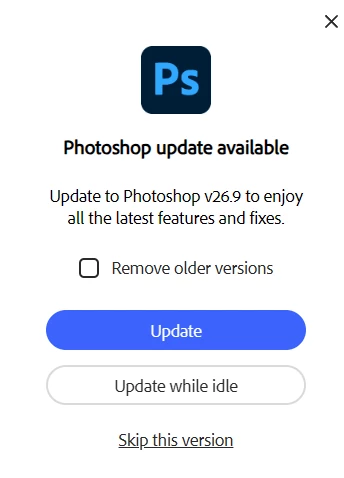
Creative Cloud suddenly opening update nag popups

  • August 18, 2025
  • 1 reply
  • 200 views

(I'm not sure if this is the best place for this, but it's the closest to "issues with Adobe CC itself" I could find.)


It's suddenly opening intrusive "update now" popups, even though I have all notification options turned off.  Nobody wants distracting popups jumping in the way of what they're currently doing.  (Think about how unusable your PC would be if every piece of software you use did this.)  How to disable these?  It only started happening recently, probably with a recent CC update.


1 reply

Shivangi_Gupta
Community Manager
Community Manager
August 18, 2025

Hi there,

We appreciate you reaching out. Please refer to this article and see if it helps: https://adobe.ly/4oFCecf

Let me know if you still have questions.

^Shivangi

zewtAuthor
Inspiring
August 19, 2025

As I mentioned, all notification options are turned off, including "App Updates" (which I assume is what should disable this).


Jeffrey_A_Wright
Community Manager
Community Manager
August 19, 2025

Thanks for the feedback, Zewt. This is expected behavior for individual subscribers and will appear when a significant update is available, in this case for Photoshop. If you click Skip this version, then the dialog will be suppressed until the next significant release is made available.


The decision on what releases are significant enough to warrant the pop-up is made by each of the application developer teams.


If you click Skip this version, Zewt, does the same dialog reappear? If so, can you provide more details about the computer and what steps you have implemented so that you don't have to click on Skip this version for the same version repeatedly?


For more information on how to manage the update process, see https://adobe.ly/4mQvJBF. ^JW