
Participant
February 1, 2018
Answered

Creative Cloud Update Error 103??

  • February 1, 2018
  • 2 replies
  • 16164 views

I'm running macOS Sierra 10.12.6 and have CC v4.3.0.256.

I'm trying to sync my web assets (Typekit fonts etc) to my desktop apps.

I can't see any of my assets under the Assets tab of CC. Instead, I see a link inviting me to install an update to CC. When I click this link it shows me: "Creative Cloud update failed. Error Code 103" with a link to here: Troubleshoot errors using Creative Cloud log files . There is no error 103 listed here, nor on any of the other help pages I've been searching.

Screengrab here:
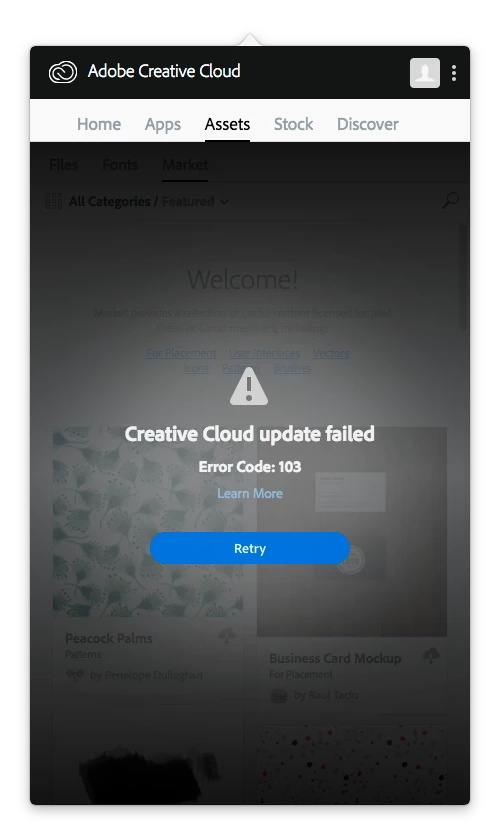
What's going on here and does anyone have a clue as to how I can resolve this and sync my online assets with my desktop apps?

I have uninstalled & reinstalled CC twice now, performed a system reboot. No change in the error status.

Thanks,

James

This topic has been closed for replies.
Correct answer kglad

confirm that you can connect to the secure adobe servers.

for help with that and other common secure adobe.com connection problems read, http://helpx.adobe.com/x-productkb/policy-pricing/activation-network-issues.html

2 replies

Kanikas
Community Manager
Community Manager
February 1, 2018
kglad
Community Expert
Community Expert
February 1, 2018

uninstall everything cc including preferences, https://helpx.adobe.com/creative-cloud/help/uninstall-remove-app.html

then uninstall the cc desktop app, https://helpx.adobe.com/creative-cloud/help/uninstall-creative-cloud-desktop-app.html

clean your computer of cc files per http://www.adobe.com/support/contact/cscleanertool.html

restart your computer (don't skip this)

reinstall the cc desktop app, https://creative.adobe.com/products/creative-cloud.

if you're unable to install the cc desktop app at this stage, use an administrator account (solution 3 here, https://helpx.adobe.com/creative-cloud/kb/creative-cloud-missing-damaged.html)

use the desktop app to install your cc programs/trials

yimflewAuthor
Participant
February 2, 2018

Thanks for this. Still no joy unfortunately. CC installs after all the removal steps you helpfully outlined. However, under the Assets tab I now have an endless 'Checking for Update' message rather than a 103 Error.

kglad
Community Expert
kgladCommunity ExpertCorrect answer
Community Expert
February 2, 2018

confirm that you can connect to the secure adobe servers.

for help with that and other common secure adobe.com connection problems read, http://helpx.adobe.com/x-productkb/policy-pricing/activation-network-issues.html