Participant
February 15, 2016
Answered

Creative cloud update install hangs at 5% then displays error code 1001. Running on Mac OSX 10.10. Happens after multiple restarts.

  • February 15, 2016
  • 1 reply
  • 1461 views

Anyone have a fix for this issue?

This topic has been closed for replies.
Correct answer Bani Verma

Hi Jay,

If you have deleted and renamed all the files mentioned above it should install, if any file was left it will not run the installer completely and the installer will quit half way.

However if still doesn't install i would suggest that you contact our CHAT/PHONE support teams as they can remote in to you machine and check the root cause of the issue.

Contact Customer Care

**Be sure to remain signed in with your Adobe ID ( Email id used for purchasing the subscription ) before accessing the link above**

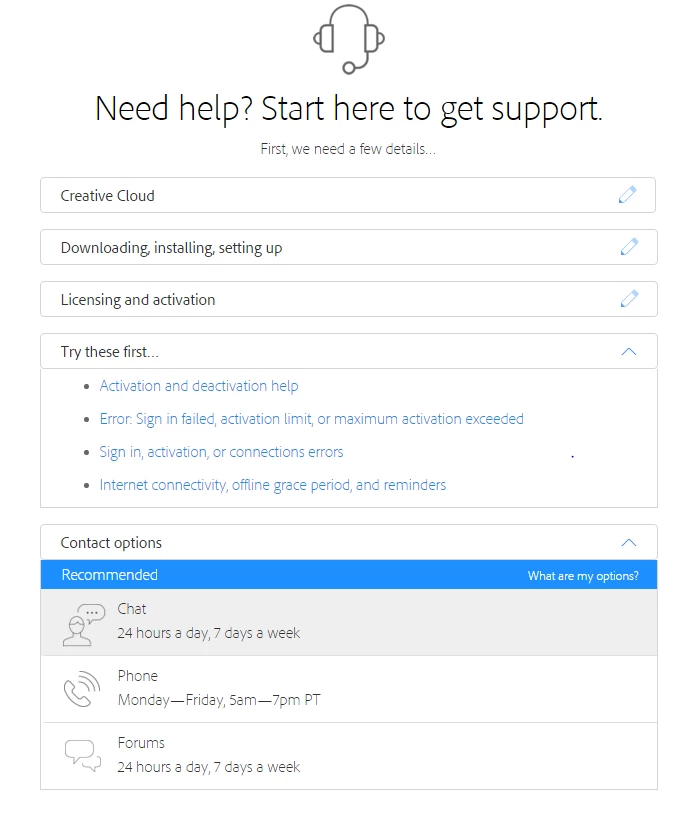
Select the exact options shown below to get support options:

Let us know if this helps.

Regards,

BANI

1 reply

Bani Verma
Legend
February 15, 2016

Hi Jay,

Please follow the below steps:

1- Force Quit the below processes in the same sequence as mentioned below from Activity Monitor: see, Use Activity Monitor on your Mac - Apple Support

  • Creative Cloud
  • Core sync & Core sync Helper
  • CC library & CCX processes
  • Adobe Desktop Common
  • Adobe Update daemon
  • After this anything that says adobe on it do a force quit for it

2- Go To: Finder > Applications > Utilities > Adobe Installer > Uninstall Adobe Creative cloud ( if having trouble uninstalling it Trash it )

3- Go To: Finder > Applications > Utilities > ( Delete these two folders - Adobe creative cloud and Adobe Application Manager )

4- Then run the cleaner tool to remove creative cloud and Adobe Application Manager ( if still left in machine )

5- Right click on Finder icon and  select "Go-To" Folder option.

6- You will get a text box, type-in below command and then hit 'Return' key.( " Do not miss ~ symbol " )

~/library ( It will open User Library folder. )

7- Then navigate to Application Support>Adobe> trash OOBE folder and AAM Updater folder as well

8- Again > Right click on Finder icon and  select "Go-To" Folder option.> You will get a text box, type-in below command and then hit 'Return' key.

/library ( It will open System Library folder.)

9- Then navigate to Application Support>Adobe> trash OOBE folder and Adobe Application Manager / after this rename the file SL-STORE as SL-STORE_OLD

10- Run Adobe Cleaner tool. > If present, Select the option "Adobe Application Manager for Mac OS X 10.6" and then click on "Clean up Selected" .

http://download.macromedia.com/SupportTools/Cleaner/mac/AdobeCreativeCloudCleanerTool.dmg

11- Click on the below link and download Creative Cloud Installer file and use the same to install the Creative Cloud Desktop application.

https://creative.adobe.com/products/creative-cloud

Let us know if this helps.

Regards,

Bani Saini

JFrizAuthor
Participant
February 15, 2016

Performed all tasks as shown. Downloaded CC. Ran installer..it started then hung there and the window closed. No error message, Nothing. Will not install after multiple restarts.

Bani Verma
Bani VermaCorrect answer
Legend
February 15, 2016

Hi Jay,

If you have deleted and renamed all the files mentioned above it should install, if any file was left it will not run the installer completely and the installer will quit half way.

However if still doesn't install i would suggest that you contact our CHAT/PHONE support teams as they can remote in to you machine and check the root cause of the issue.

Contact Customer Care

**Be sure to remain signed in with your Adobe ID ( Email id used for purchasing the subscription ) before accessing the link above**

Select the exact options shown below to get support options:


Let us know if this helps.

Regards,

BANI