


Participant
February 21, 2020
Answered

Creative cloud update stuck at 14% and so do other apps

  • February 21, 2020
  • 1 reply
  • 1127 views

Hi,


I'm trying to update creative cloud and my other adobe apps. It always stops at 14% and i've tried numerous solutions found online, even adobe support couldnt help me and i had to install everything using direct links provided by adobe employee through live chat. It's getting really annoying.


I can't install or update anything through adobe cc. I want to buy AI also, but i just cant be bothered going through hours of just getting one app to work.
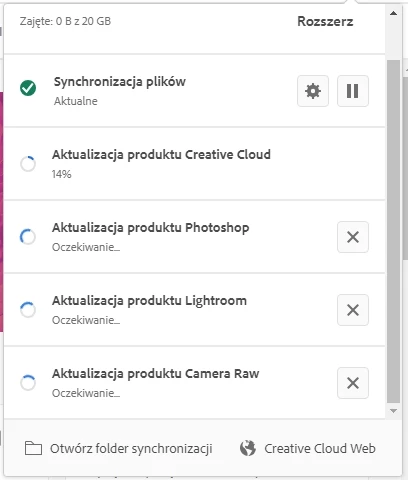


Can someone pleeeeease help?

This topic has been closed for replies.
Correct answer Jeffrey_A_Wright

I am sorry, KariBu7, but you are looking for fatal errors.


As a next step please download and run the CC Log Collector Tool from http://helpx.adobe.com/creative-cloud/kb/cc-log-collector.html. Once you have uploaded the log files then please contact our support team at https://helpx.adobe.com/contact.html so that additional assistance can be provided to diagnose the errors you are facing.


I would also recommend bookmarking https://helpx.adobe.com/x-productkb/policy-pricing/customer-support-portal.html which provides information on how you can update active support cases.  Only by continuing to work directly with our support team will any progress can be made.


If you do locate a fatal error, KariBu7, then please do update this public forum discussion so that additional suggestions can be provided.

1 reply

Jeffrey_A_Wright
Legend
February 21, 2020

KariBu7 do you ever receive a specific error message or does the install just get stuck at 14% each time?  If you are unsure, then please check the log files where the errors will be recorded. Information on how to locate and interpret the logs can be found at  https://helpx.adobe.com/creative-cloud/kb/troubleshoot-download-install-log-files.html.

KariBu7Author
Participant
February 21, 2020

I'm not getting any error codes in install logs


The only thing that has an error prefix next to it is that line from CoreSyncInstall.log:

Error: registry.helper: Failed to open registry key: 80000000, key: Wow6432Node\Interface\{F4FCF137-0EAE-4FA1-8B39-44320D24AF52}. Error code is 2 (registryhelper.cpp.jura::os::RegistryHelper::GetRegistryKey.120)

Jeffrey_A_Wright
Jeffrey_A_WrightCorrect answer
Legend
February 21, 2020

I am sorry, KariBu7, but you are looking for fatal errors.


As a next step please download and run the CC Log Collector Tool from http://helpx.adobe.com/creative-cloud/kb/cc-log-collector.html. Once you have uploaded the log files then please contact our support team at https://helpx.adobe.com/contact.html so that additional assistance can be provided to diagnose the errors you are facing.


I would also recommend bookmarking https://helpx.adobe.com/x-productkb/policy-pricing/customer-support-portal.html which provides information on how you can update active support cases.  Only by continuing to work directly with our support team will any progress can be made.


If you do locate a fatal error, KariBu7, then please do update this public forum discussion so that additional suggestions can be provided.