
Participant
February 1, 2019
Answered

Creative Cloud won't launch

  • February 1, 2019
  • 2 replies
  • 715 views

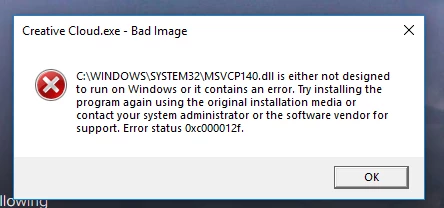
For the last couple of days, instead of CC launching, I've been getting the error message shown in the attached jpg.
I have tried unstalling (with the Adobe uninsaller program) and reinstalling CC, but I still get the same error.
How can I fix this, please?
This topic has been closed for replies.
Correct answer AxelMatt

Take a look here:

Photoshop.exe- Bad Image Error on Program Opening in Windows 10

Here you'll find the approriate installation files for the Visual C++ Redistributables

https://support.microsoft.com/en-us/help/2977003/the-latest-supported-visual-c-downloads

2 replies

AxelMattCommunity ExpertCorrect answer
Community Expert
February 1, 2019

Take a look here:

Photoshop.exe- Bad Image Error on Program Opening in Windows 10

Here you'll find the approriate installation files for the Visual C++ Redistributables

https://support.microsoft.com/en-us/help/2977003/the-latest-supported-visual-c-downloads

My System: Intel i7-8700K - 64GB RAM - NVidia Geforce RTX 3060 - Windows 11 Pro 25H2 -- LR-Classic 15 - Photoshop 27 - Nik Collection 9 - PureRAW 6 - Topaz Photo AI
Participant
February 1, 2019

Thank you - I had reinstalled the Visual C++ Redistributables but the link I'd found was an old version.
All sorted now.

kglad
Community Expert
Community Expert
February 1, 2019

update your ms visual c++