
Participant
October 7, 2018
Answered

Creative Files in Explorer as a Drive

  • October 7, 2018
  • 1 reply
  • 439 views

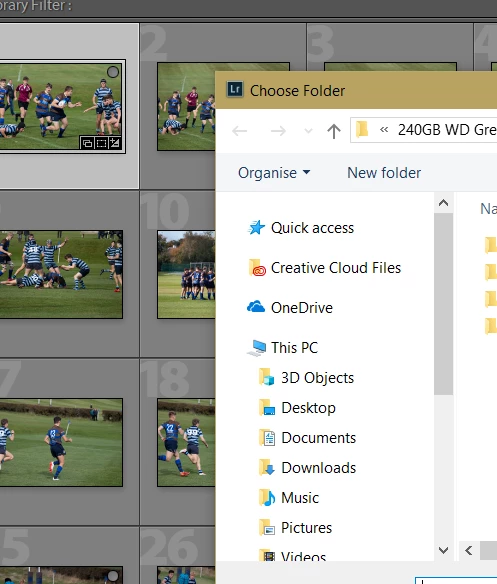
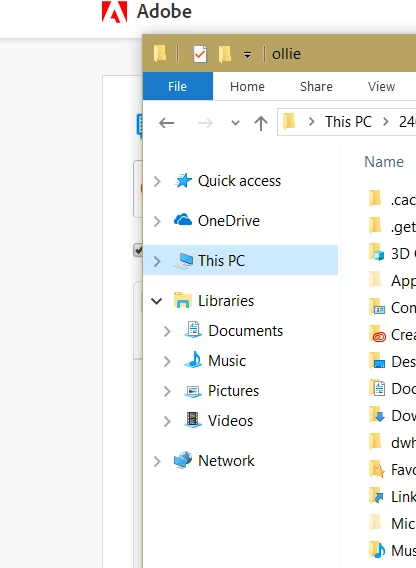
Hi Guys, Does anyone know how to put the Creative Files folder in the left hand pane of Windows Explorer, like OneDrive is? I know you can pin the folder to quick access but that's not what I want. In the images below, you can see how OneDrive appears like a drive in the same hierarchy as 'This PC', but Creative Files isn't there. However, if you go to the export window inside Lightroom, Creative Files is there like a drive next to OneDrive - how do you put it there in a normal explorer window?

Thanks,

Ollie
This topic has been closed for replies.
Correct answer Nancy OShea

That's not how File Explorer works. Creative Cloud is not a drive like OneDrive or DropBox.  It's just a folder on your hard drive that happens to Sync with your Creative Cloud space.

1 reply

Nancy OShea
Community Expert
Nancy OSheaCommunity ExpertCorrect answer
Community Expert
October 7, 2018

That's not how File Explorer works. Creative Cloud is not a drive like OneDrive or DropBox.  It's just a folder on your hard drive that happens to Sync with your Creative Cloud space.

Nancy O'Shea— Product User & Community Expert