geoffreyb70670704
Participant
December 19, 2022
Answered

CS 5 won't install

  • December 19, 2022
  • 4 replies
  • 790 views

Hello

I bought CS5 in 2013 (as I remember). It's an old product but I can work with it.

I had a bit of trouble installing it at the time. The support term helped me overcome it, as follows:

[Personal/sensitve information removed by moderator.]

Hello, Thank you for calling adobe customer services ... Thanks and regards Adobe Customer Support


The problem was that I had bought just at the time of transition from CS4 to CS5. So there were some hoops to jump through to validate the installation.


Anyhow, since then, I have been using the same desktop. But it just died. So I got a new desktop and am trying to install CS5 on it,

The validation process seizes up in the middle. Details are in the attached file.


Thanks for your help

 

This topic has been closed for replies.
Correct answer Peru Bob

4 replies

kglad
Community Expert
Community Expert
December 19, 2022

i don't see anything in your attachment, but @Peru Bob must have seen something to infer you're trying to install an upgrade version of cs5.


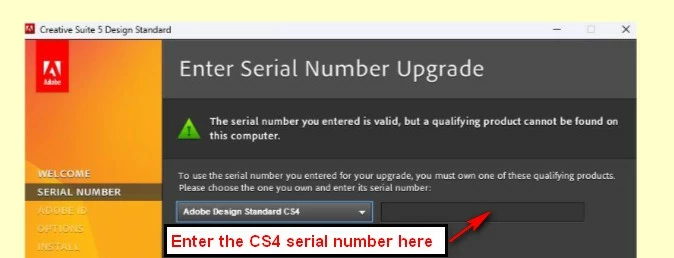
if that's true, when you start to install, you'll be prompted for your cs5 serial number. you will then be presented with a dropdown that allows you to select the qualifying version (eg, cs4). select the qualifying version you own and then enter its (eg,cs4) serial number.


enter the correct number at the correct time and installation will proceed.

Peru Bob
Community Expert
Community Expert
December 19, 2022

@kglad  the image I posted in my reply is a cropped version of the attachment posted by the OP.

kglad
Community Expert
Community Expert
December 19, 2022

@Peru Bob 


i know now.  but you hadn't posted when i replied. 


and after you posted the op's link was still clickable and broken.  some seconds/minutes later you removed that broken link (that i was going to fix by using your redacted image).

John T Smith
Community Expert
Community Expert
December 19, 2022

As well as what Peru Bob said, is your new computer Mac or Windows... and exactly which operating system?


IF WINDOWS

Two ideas that MAY work to install and/or run old programs in Windows 10 or Windows 11
-RIGHT click the program icon or EXE and select a compatibility mode in the pop up option window
-and/or select Run as Administrator to assign FULL Windows permissions
-also https://helpx.adobe.com/x-productkb/global/create-local-administrator-account-windows.html

Peru Bob
Community Expert
Community Expert
December 19, 2022

This is not Adobe support, but a forum that is seen by the public. Please don't post serial numbers in this public forum.  Hopefully nobody has stolen your number before I deleted it.


I also deleted the attached image because it had a serial number.

kglad
Community Expert
Community Expert
December 19, 2022

@Peru Bob 


that explains the attachment issue.  i'll fix that.


oops, already fixed.

Peru Bob
Community Expert
Peru BobCommunity ExpertCorrect answer
Community Expert
December 19, 2022